You’re ready to start a website. Then a hosting company asks you to choose a plan filled with words like server space, storage, databases, and shared hosting.
What are you actually buying?
Where does your website go after you pay? And how does that make it appear when someone types in your domain?
Web hosting is much easier to understand once you can picture the physical setup behind it.
Key Takeaways
- Servers Are Real Computers: Your website is stored on physical equipment somewhere.
- Hosting Is Rented Space: You pay to use part of a server and its computing power.
- Your Website Lives There: Its pages, images, code, and data are kept in your hosting account.
- Your Domain Leads Visitors There: It points people toward the server holding your site.
- The Server Sends the Site Back: It delivers the requested page whenever someone visits.
How Web Hosting Actually Works
Here’s the basic setup.
A hosting company runs powerful computers called servers. Your website’s files, images, code, and data are stored on one of those servers so they’re available online.
When someone visits your site, their browser sends a request to that server. The server finds the right page and sends the information back so it can appear on their screen.
Those servers usually sit in data centers with fast internet, cooling systems, backup power, and security. Some hosting companies own the equipment themselves, while others rent server space from larger providers.
That’s the core of web hosting: your site lives on an internet-connected server that’s ready to respond whenever someone visits.
How Does Your Website Get Onto the Server?
After you buy hosting, the company creates an account and space for your site.
Then you put the website there by:
To be clear, WordPress isn’t hosting. It’s software used to build and manage a website, and it still needs a server where it can run.
Once your site is set up, its pages, images, code, and data are saved in your hosting account. A blog may store posts and pictures. An online store may also store product details, prices, and customer data.
At that point, you connect your domain so people can reach the site.
What Happens When Someone Visits Your Website?
Suppose someone types yourwebsite.com into a browser.
The domain points the browser toward the server that hosts your site. A system called DNS makes that connection, but you don’t need to understand its technical details to buy hosting.
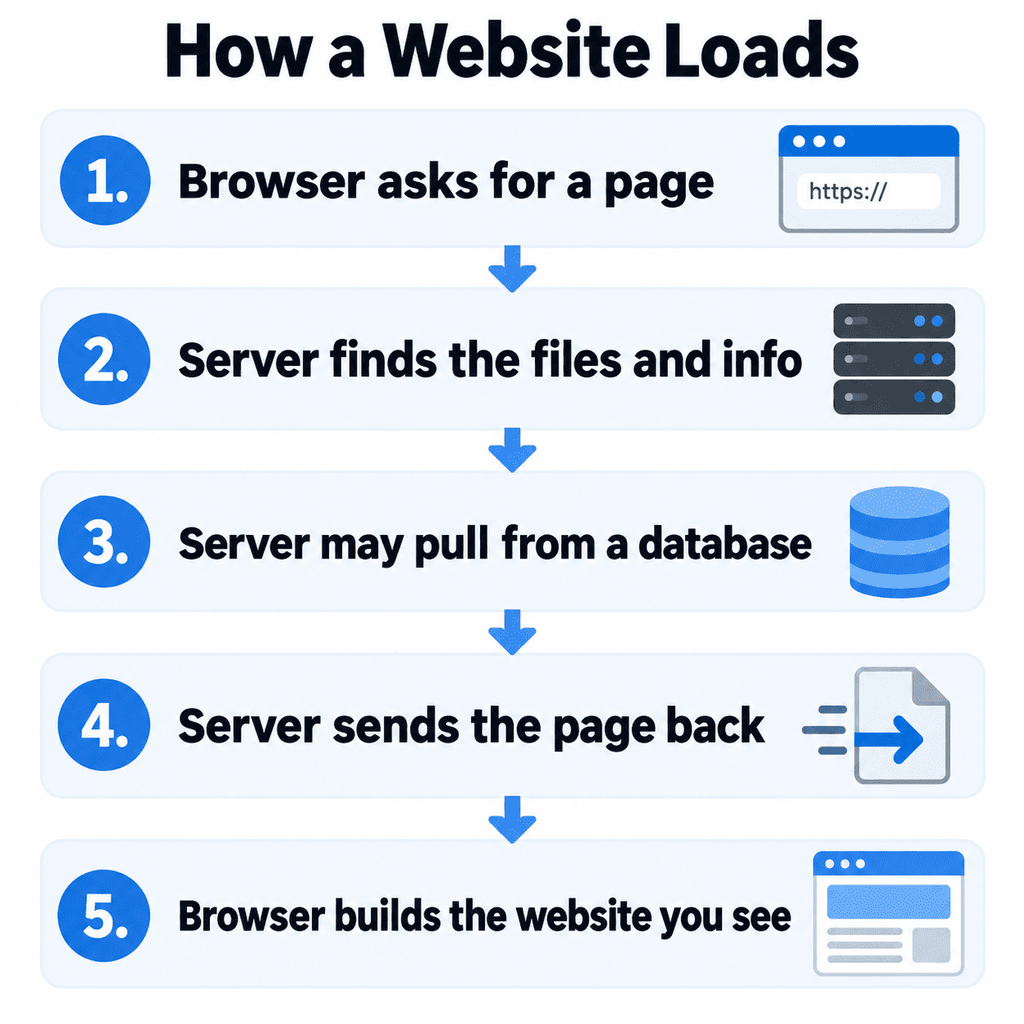
Once the browser reaches the server:
For a homepage, the server may send text, images, colors, and layout files. For a store, it might also pull a product’s price and current stock before sending the page.
That’s why hosting is more than digital storage. The server holds the website and responds every time someone visits.
What Kind of Hosting Does a New Website Need?
Most new websites don’t need an expensive private server.
A new blog, portfolio, hobby site, or small-business website can often start with shared hosting. That means several customers use the same physical server and share its computing power.
It’s like renting an apartment in a larger building. You have your own space, but you share the building with other people.
You may not need to buy hosting separately. Website builders such as Wix, Squarespace, and Shopify include it in their service. The servers still exist. The platform simply manages them for you.
When comparing options, ask:
You can move to a stronger plan later if your website grows.
Final Verdict
Let’s summarize:
Web hosting is rented space and computing power on a server.
You add your website, connect your domain, and the server sends your pages to visitors whenever they request them.
Once you understand that, choosing a plan becomes a lot easier, and hopefully, so will running your business, whether you’re launching a personal blog or a digital empire.
If you still need the address vs storage split, start with domain vs hosting before you buy either one.
FAQs
Is a web server a physical computer?
Yes. A server is a physical computer, although cloud hosting may spread website data and work across several connected machines.
Do hosting companies own their servers?
Some do. Others rent servers, data center space, or cloud computing power from larger providers.
Where is my website stored when I buy hosting?
Your website is stored on a server in a data center. The exact location depends on the hosting company and plan.
Is WordPress the same as web hosting?
No. WordPress is website-building software. It needs hosting so it has a server where it can run.
What type of hosting does a new website need?
Most small new websites can begin with shared hosting or a website builder that already includes hosting.

![Hosting.com Coupon Discounts [Verified October 2026 ]](https://www.miamiherald.com/careers-education/wp-content/uploads/sites/2/2026/10/hosting-com-promo-code-mh-1024x768.jpg)

![Bluehost Promo Codes and Discounts [Verified Coupons]](https://www.miamiherald.com/careers-education/wp-content/uploads/sites/2/2026/10/bluehost-promo-code-mh-1024x768.jpg)
![Incogni Promo Codes [Verified Discounts]](https://www.miamiherald.com/careers-education/wp-content/uploads/sites/2/2026/10/incogni-promo-code-mh-1024x768.jpg)
![Shopify Promo Codes [Verified Discounts]](https://www.miamiherald.com/careers-education/wp-content/uploads/sites/2/2026/10/shopify-promo-code-mh-1024x768.jpg)