If you’ve ever moved a file from your computer to a website, you may have come across FTP without realizing it. FTP, or File Transfer Protocol, has been around for more than 50 years, making it one of the internet’s oldest ways to move files from one computer to another.
Key Takeaways
- FTP meaning: It stands for File Transfer Protocol and provides rules for transferring files over a network.
- What FTP does: It lets you upload, download, and manage files on a remote server.
- FTP server: An FTP server is a computer or server that provides access to files through FTP.
- FTP client: An FTP client is the software you use to connect to an FTP server and transfer files.
- FTP vs. SFTP: SFTP uses SSH to create an encrypted connection, while traditional FTP isn’t encrypted by default.
What Is FTP?
FTP is a standard way for computers to transfer files over a network. Think of it like a delivery service for digital files. You have a file on your computer, and you want to send it somewhere else. FTP provides the rules that let your computer and another computer communicate so you can transfer the file.
You can use FTP to upload files to a remote computer or download files from it. It can also handle tasks like creating directories, renaming files, and deleting files, depending on your access.
FTP isn’t a website or an app. It’s a protocol, which, simply put, is just a set of rules computers follow when communicating.
What Is FTP Used For?
Common uses include:
- Uploading files to a website
- Downloading files from a server
- Moving large numbers of files
- Managing website files and folders
- Transferring files between computers on a network
You won’t need FTP to send a photo to a friend or share a document with a coworker. Cloud storage, email, and messaging apps are much simpler for those jobs.
How Does FTP Work?
FTP uses two sides: a server that provides the files and a client that connects to the server.
The basic process looks like this:
- You open an FTP client.
- You enter the FTP server’s address and your login information.
- The client connects to the server.
- You browse the files and folders you have permission to access.
- You upload, download, or manage files.
- You disconnect when you’re finished.
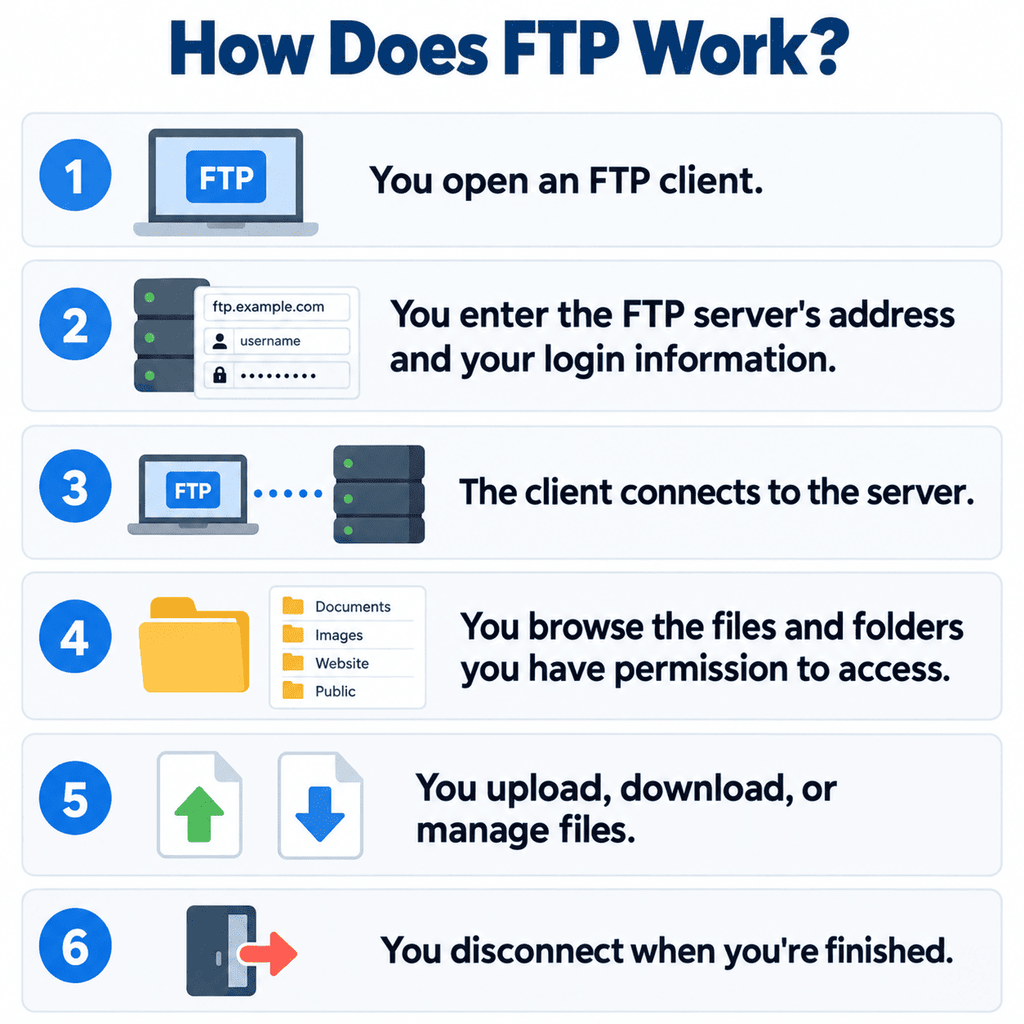
The FTP client handles the communication with the server, so you don’t have to know FTP commands to transfer a file.
FTP also uses separate connections for sending commands and transferring data. This is part of the protocol’s underlying design.
What Is an FTP Server?
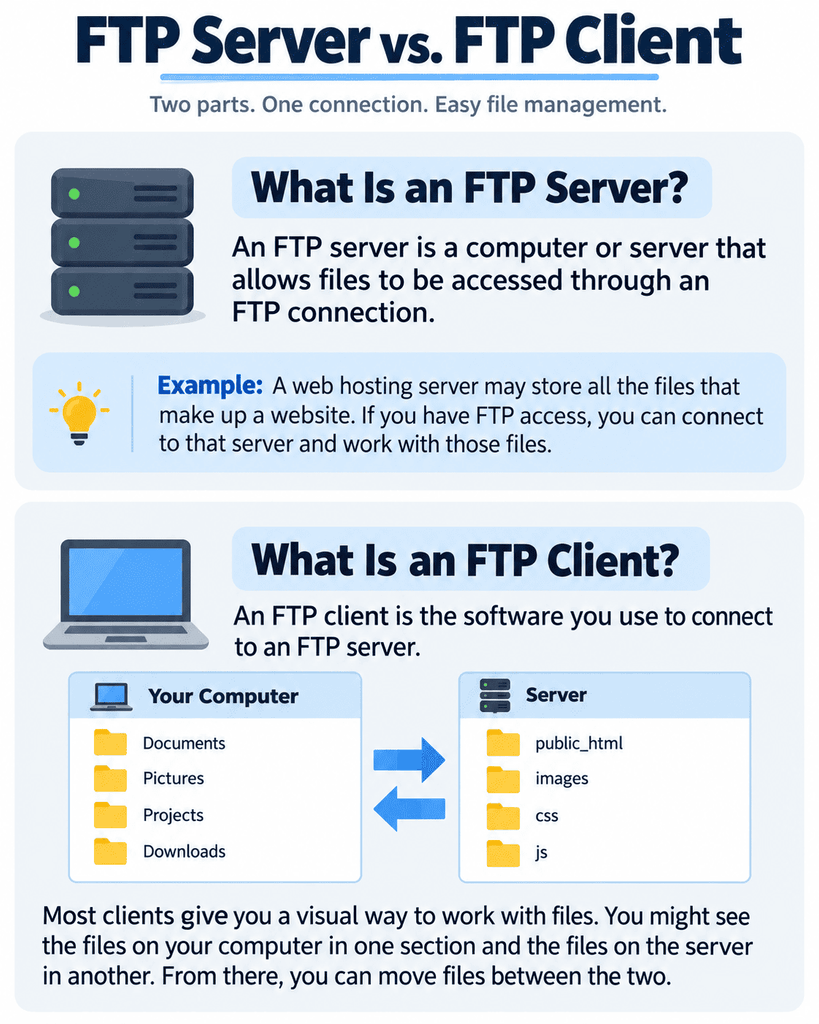
An FTP server is a computer or server that allows files to be accessed through an FTP connection.
For example, a web hosting server may have all the files that make up a website. If you have FTP access, you can connect to that server and work with those files.
What you’re allowed to do depends on your permissions. You may be able to upload and download files, while other users may have permission to do more or less.
What Is an FTP Client?
An FTP client is the software you use to connect to an FTP server.
Most clients give you a visual way to work with files. You might see the files on your computer in one section and the files on the server in another. From there, you can move files between the two.
This is generally where FTP becomes much less intimidating. Once you’re connected, transferring a file can be as simple as dragging it from one side of the window to the other.
How to FTP
If someone tells you to “FTP a file,” they’re usually asking you to connect to an FTP server and transfer a file.
You’ll usually need:
- An FTP client
- The server address
- A username
- A password
- A port number, if one is required
Once you have that information, the process is usually straightforward.
- Open your FTP client.
- Enter the server information. Add the address, username, password, and any other connection details you’ve been given.
- Connect to the server. The FTP client will establish the connection.
- Find the file you want to transfer. You can locate a file on your computer to upload or find a file on the server you want to download.
- Transfer the file.
Many FTP clients let you drag and drop files between your computer and the server.
The exact process varies by client, but these are the basic steps you’ll follow.
FTP vs. SFTP: What’s the Difference?
FTP and SFTP can both transfer files, but there’s an important difference between them: security.
Traditional FTP does not encrypt the information sent over the connection by default. That makes it a poor choice for transferring sensitive information when security is a concern.
SFTP stands for SSH File Transfer Protocol. It uses SSH, or Secure Shell, to create an encrypted connection between the client and server.
Here’s a quick comparison:
| FTP | SFTP | |
|---|---|---|
| Full Name | File Transfer Protocol | SSH File Transfer Protocol |
| Encryption | Not encrypted by default | Uses an encrypted SSH connection |
| Security | Less suitable for sensitive transfers | Designed for secure file transfers |
| Technology | FTP | SSH |
Despite their similar names, SFTP isn’t just FTP with added security. It’s a separate protocol that uses SSH.
If you’re choosing between FTP and SFTP for transferring sensitive files, SFTP is usually the safer option.
Is FTP Still Used?
Yes. FTP is an older technology, but it’s still around.
You may find yourself using it when managing a website, working with a server, or using a hosting service that provides access to it.
Newer tools have made file sharing easier for many people, but FTP is still useful when you need direct access to a server’s files.
Final Thoughts
FTP might sound like something reserved for programmers, but the basic idea is pretty simple. Once you understand the difference between an FTP server and an FTP client, the process is easier to picture. And when security matters, knowing the difference between FTP and SFTP is important, too.
If you want the machine that answers browser requests, read what a web server is next.
FAQs
What does FTP stand for?
FTP stands for File Transfer Protocol. It’s a set of rules that allows computers to transfer files over a network.
What is FTP used for?
FTP is used to upload, download, and manage files on a remote server. It’s commonly used for website files or other files stored on a server.
What is an FTP server?
An FTP server is a computer or server that provides access to files through an FTP connection. The server also controls what connected users can do.
What is an FTP client?
An FTP client is software that connects your computer to an FTP server. It provides an interface for browsing folders and transferring files.
Is SFTP more secure than FTP?
Yes. SFTP uses SSH to create an encrypted connection, while traditional FTP does not encrypt the connection by default.

![Hosting.com Coupon Discounts [Verified October 2026 ]](https://www.miamiherald.com/careers-education/wp-content/uploads/sites/2/2026/10/hosting-com-promo-code-mh-1024x768.jpg)

![Bluehost Promo Codes and Discounts [Verified Coupons]](https://www.miamiherald.com/careers-education/wp-content/uploads/sites/2/2026/10/bluehost-promo-code-mh-1024x768.jpg)
![Incogni Promo Codes [Verified Discounts]](https://www.miamiherald.com/careers-education/wp-content/uploads/sites/2/2026/10/incogni-promo-code-mh-1024x768.jpg)
![Shopify Promo Codes [Verified Discounts]](https://www.miamiherald.com/careers-education/wp-content/uploads/sites/2/2026/10/shopify-promo-code-mh-1024x768.jpg)