
There were 401.6 million domain name registrations worldwide at the end of the second quarter of 2026, according to VeriSign. With so many domains registered, it helps to know what actually happens when you need to move one.
Knowing how to transfer a domain can save you a headache when it’s time to move a website to a new registrar or hand a domain over to someone else. The tricky part is knowing whether you’re moving the domain to a different registrar or transferring ownership to another person. Those are two different things.
Key Takeaways
- Domain transfer: Move your domain from one registrar to another.
- Ownership transfer: Change the person or organization listed as the domain’s registrant.
- Authorization code: A unique code your registrar uses to help authorize a transfer.
- Transfer timing: A registrar-to-registrar transfer can take up to five calendar days after the transfer request reaches the registry, although it may finish sooner.
- Before you start: Check that the domain is unlocked, eligible for transfer, and not close to expiration.
What Is a Domain Transfer?
A domain transfer moves a domain name from one domain registrar to another.
For example, suppose you registered your domain with GoDaddy but later decide you want to manage it through Namecheap. You can transfer the domain from GoDaddy to Namecheap while keeping the same domain name.
The transfer doesn’t mean your website has to move. Your domain registrar and web host are separate services, so changing registrars doesn’t necessarily mean moving your website, files, or email.
Another process often confused with a domain transfer is changing the domain’s owner. If you sell your domain to someone else, for example, you’re changing the registered owner rather than simply moving the domain to another registrar.
How to Transfer a Domain to Another Registrar
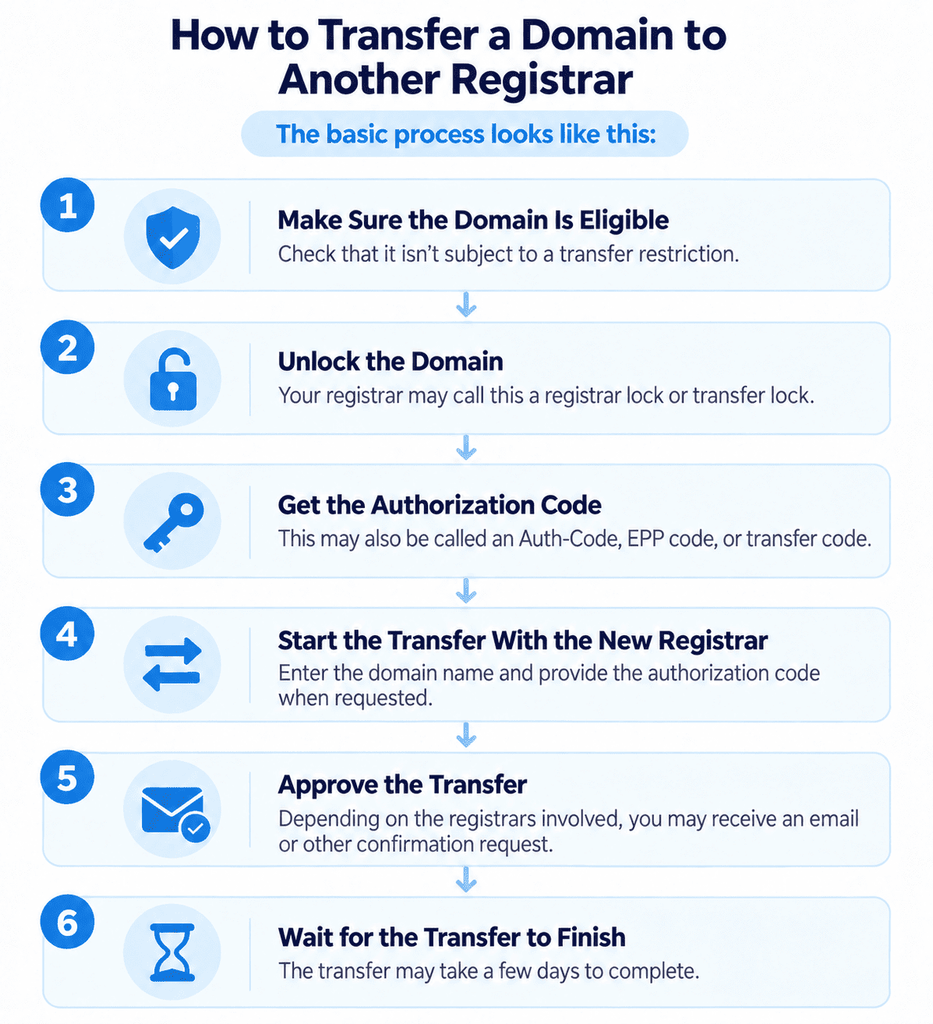
The basic process looks like this:
Check that it isn’t subject to a transfer restriction.
Your registrar may call this a registrar lock or transfer lock.
This may also be called an Auth-Code, EPP code, or transfer code.
Enter the domain name and provide the authorization code when requested.
Depending on the registrars involved, you may receive an email or other confirmation request.
The Internet Corporation for Assigned Names and Numbers (ICANN), which helps coordinate the global domain name system, sets rules for transferring domains between registrars. Under its transfer policy, registered domain holders can transfer their domains subject to certain restrictions.
The exact buttons and wording vary by registrar. That’s one thing I noticed when looking into the process: the underlying rules are fairly standardized, but the actual account menus aren’t. So don’t worry if your registrar’s instructions don’t use the same terminology as another company’s.
You generally don’t need to change your nameservers just because you’re transferring the domain. If your website is already connected to the domain, check the new registrar’s instructions before changing anything.
How to Transfer Domain Ownership to Someone Else
If you want to transfer a domain to someone else, you’re dealing with a change of registrant rather than a registrar transfer.
For example, if you sell a domain name to another person, you can contact the registrar where the domain is currently registered and request a Change of Registrant.
The registrar will guide you through the steps required to complete the change.
This is different from transferring the domain to another registrar.
You could:
- Keep the domain at the same registrar and change its owner.
- Change the owner, then move the domain to a different registrar.
- Move the domain to another registrar without changing its owner.
If you’re doing both, pay attention to the order. A registrar may let the registered name holder opt out of the 60-day transfer lock before you make the change.
How to Get Your Domain Authorization Code
Your domain transfer authorization code is a unique code that verifies you’re authorized to transfer the domain.
You may see it referred to as:
- Auth-Code
- Authorization Code
- AuthInfo Code
- EPP code
- Transfer code
To get yours, log in to your current registrar and look for the domain’s transfer, security, or management settings. Some registrars let you generate the code yourself. Others require you to request it from customer support.
For generic top-level domains covered by ICANN’s policy, registrars must provide the Auth-Code within five calendar days of a request if they don’t provide a way for you to generate it yourself.
Keep the code private. It’s part of the authorization process for moving the domain, so you shouldn’t share it casually.
How Long Does a Domain Transfer Take?
A registrar-to-registrar domain transfer generally takes up to five calendar days once the transfer request reaches the registry. However, it can happen sooner if the required approval is completed promptly.
A transfer can also take longer if the domain is locked, the authorization code is incorrect, or a required confirmation hasn’t been completed.
There are also situations where you can’t transfer the domain yet. Under ICANN’s rules, a domain generally can’t be transferred to another registrar within 60 days of its initial registration, within 60 days of a previous registrar transfer, or during the 60-day lock that can follow a change of registrant.
What to Check Before Transferring a Domain
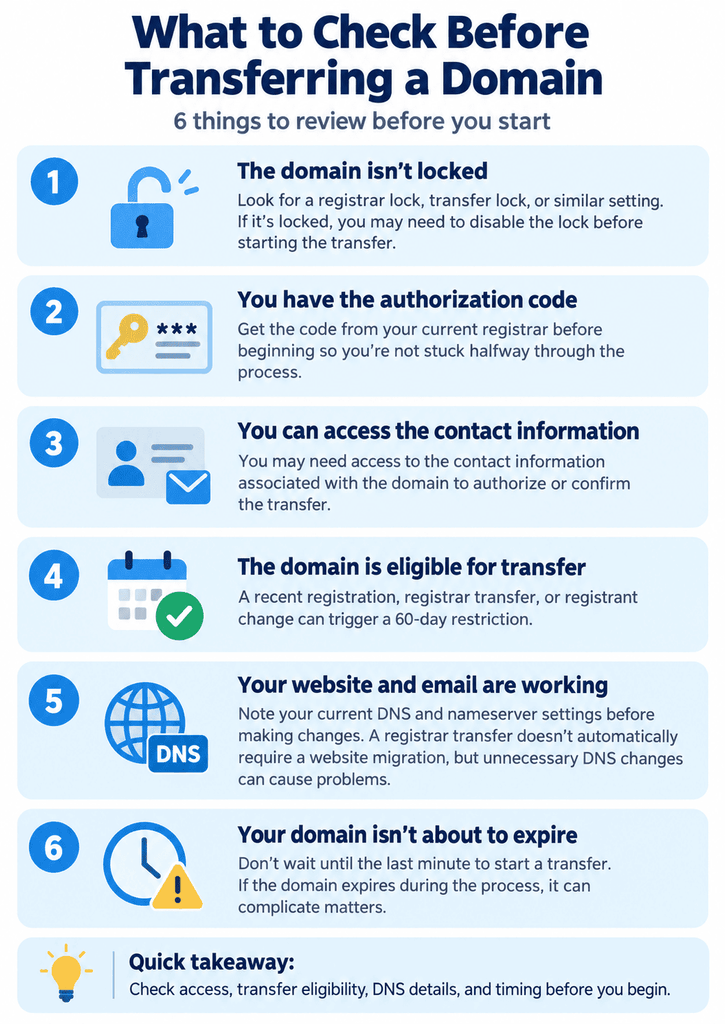
Before starting the domain transfer process, take a few minutes to check the following:
Look for a registrar lock, transfer lock, or similar setting. If it’s locked, you may need to disable the lock before starting the transfer.
Get the code from your current registrar before beginning so you’re not stuck halfway through the process.
You may need it to authorize or confirm the transfer.
A recent registration, registrar transfer, or registrant change can trigger a 60-day restriction.
Note your current DNS and nameserver settings before making changes. A registrar transfer doesn’t automatically require a website migration, but unnecessary DNS changes can cause problems.
Don’t wait until the last minute to start a transfer. If the domain expires during the process, it can complicate matters.
If you’re unsure who your current registrar is, ICANN’s registration data lookup tool can show the registrar associated with a domain.
Common Domain Transfer Problems
Domain transfers are pretty manageable, but a few issues come up repeatedly.
Check your registrar account for a transfer lock or contact the registrar if you can’t remove it yourself.
Make sure you’re using the current code and entering it exactly as provided. If necessary, request a new one from your registrar.
Check whether the domain is subject to a transfer restriction.
Check your email and registrar account for an outstanding transfer approval.
Your registrar should provide a reason when it denies a transfer request, except when the applicable rules require denial.
If you’re stuck, contacting the current registrar is usually the best first step. Even if you originally registered the domain through a reseller or another service, the registrar can help with transfer issues.
Final Thoughts
Once you separate moving a domain from one registrar to another from changing who owns the domain, the process is much easier to understand. Check the domain’s eligibility, get your authorization code, and follow the instructions from the registrar handling the transfer. Most of the work is just about making sure the right person approves the right request at the right time.
A registrar move does not move your website files. Domain vs hosting shows why you may still need to point DNS after the name arrives.
FAQs
How do I transfer a domain name to another person?
To transfer a domain name to another registrar, unlock the domain if necessary, get its authorization code, and start the transfer with the new registrar. Then complete the required authorization steps.
How do I transfer a domain name to another registrar?
To transfer a domain name to another registrar, unlock the domain, obtain its authorization code, and start the transfer through the new registrar. You may also need to approve a confirmation request before you can complete the transfer.
How long does a domain transfer take?
A domain transfer generally takes up to five calendar days once the transfer request reaches the registry, although it may finish sooner if the required authorization is completed promptly.
What is a domain transfer authorization code?
A domain transfer authorization code is a unique code your registrar provides to verify that you’re authorized to move the domain to another registrar. It’s also known as an Auth-Code, AuthInfo Code, EPP code, or transfer code.
Can I transfer a domain if I just registered it?
You generally cannot transfer a domain to another registrar during the first 60 days after its initial registration. A similar restriction can apply for 60 days after a previous registrar transfer.

![Hosting.com Coupon Discounts [Verified November 2026 ]](https://www.miamiherald.com/careers-education/wp-content/uploads/sites/2/2026/10/hosting-com-promo-code-mh-1024x768.jpg)
![Bluehost Promo Codes and Discounts [Verified Coupons]](https://www.miamiherald.com/careers-education/wp-content/uploads/sites/2/2026/10/bluehost-promo-code-mh-1024x768.jpg)
![Incogni Promo Codes [Verified Discounts]](https://www.miamiherald.com/careers-education/wp-content/uploads/sites/2/2026/10/incogni-promo-code-mh-1024x768.jpg)
![Shopify Promo Codes [Verified Discounts]](https://www.miamiherald.com/careers-education/wp-content/uploads/sites/2/2026/10/shopify-promo-code-mh-1024x768.jpg)