Every time you open a website, your browser is asking another computer for something. In 2025, Cloudflare’s network alone handled an average of more than 81 million HTTP requests per second. So what exactly answers all those requests?
If you’ve ever asked yourself, “What is a web server,” the short answer is that it’s the technology responsible for delivering website content to your browser. And while the name sounds technical, the idea is pretty simple: your browser asks for something, and the server sends it back.
Key Takeaways
- Web server definition: A web server can refer to the computer, the software running on it, or both working together to deliver website content.
- How it works: Your browser sends a request, and the web server responds with the requested webpage, file, or other resource.
- What it does: Web servers receive requests, process them, and return the appropriate response, including an error when something goes wrong.
- Types and examples: Apache, Nginx, Microsoft IIS, LiteSpeed, and Caddy are examples of web server software.
- Web server vs. hosting: A web server handles requests and delivers content, while web hosting is the service and infrastructure that makes a website available online.
What Is a Web Server?
A web server is a system that receives requests for website content and sends the appropriate response to a web browser or another internet-connected application.
The term can be confusing because a web server refers to the physical or virtual computer where website files and applications run, the software that handles web requests, or both.
For someone who isn’t working in web development, you don’t need to get hung up on that distinction. Think of a web server as the behind-the-scenes technology that helps deliver a website to your screen.
How Does a Web Server Work?
The easiest way to understand how a web server works is to think about what happens when you visit a website.
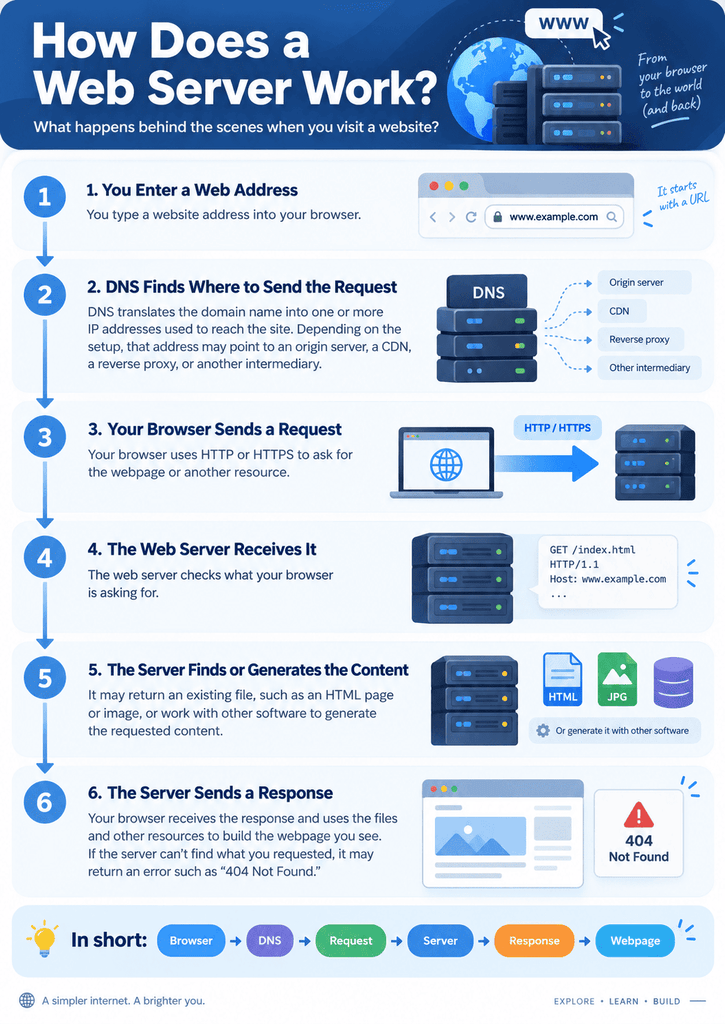
Say you type a website address into your browser. Several things happen behind the scenes:
- Your browser figures out where to send the request.
- The Domain Name System, or DNS, helps translate the website’s domain name into one or more IP addresses used to reach the site. Depending on the website’s architecture, that address may belong to the origin server, a CDN, a reverse proxy, or another intermediary.
- Your browser sends a request.
- It uses HTTP or HTTPS to ask for the webpage or another resource.
- The server receives the request. The web server looks at what your browser is asking for.
- The server finds or generates the content.
- It might send back an existing file, such as an HTML document or image, or work with other software to generate the requested content.
- The server sends a response.
- Your browser receives the response and uses the files and other resources to build the webpage you see.
- If the server can’t find what you requested, it can return an error instead. The familiar 404 Not Found message is one example.
What Does a Web Server Do?
As I started digging into how websites actually work, I found that the concept is much simpler than some of the terminology makes it sound. At its simplest, a web server has one main job: respond to requests for web resources.
Those resources can include:
- HTML files
- Images
- CSS files
- JavaScript
- Videos
- Documents
- Other files or data
A web server also handles the rules for how it delivers those resources. For example, it can determine whether a requested file exists, return an appropriate status code, and apply certain security or access settings.
Not every webpage is simply a file sitting on a server waiting to be sent. Many websites are dynamic. In those cases, the web server may work with an application server and database to produce the content a visitor requested before sending it to the browser.
That’s why two people visiting the same website don’t necessarily receive an identical page. A website can use information such as a user’s account, search query, or other input to determine what content to display.
Types of Web Servers
There are several types of web server software. You don’t need to know how to configure them to understand what they are used for.
Remember, these are examples of web server software, not different kinds of websites. Their job is broadly similar: receive requests and deliver the appropriate responses.
What Does a Web Server Look Like In the Real World?
Imagine you visit an online news site and click on an article. Your browser sends a request for that page. The website’s infrastructure receives the request and sends back the resources your browser needs to display the article.
That might include the page’s HTML, images, stylesheets, and JavaScript. Your browser then puts those pieces together and displays the finished page.
The same basic process happens when you visit an online store, check your email through a web browser, or look up information on a search engine.
The details behind those websites can be extremely complicated, but the basic client-server relationship stays the same: the client makes a request, and the server responds.
Web Server vs. Web Hosting: What’s the Difference?
Web server vs. web hosting can be confusing because the terms are closely related.
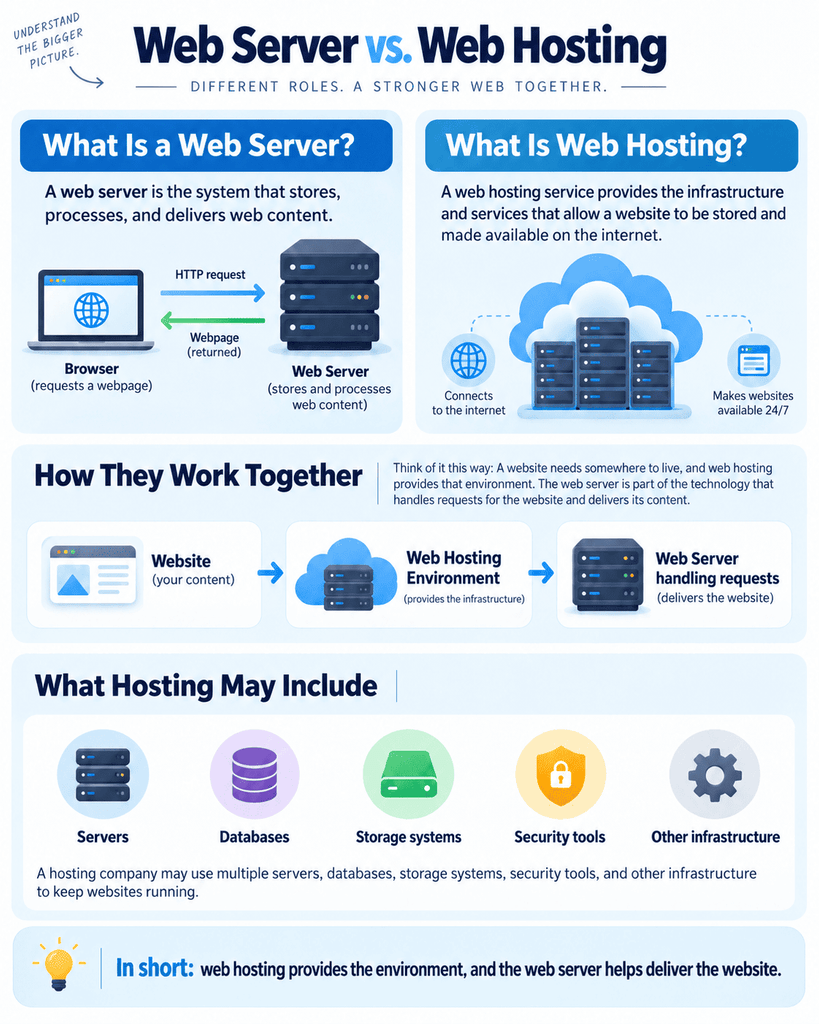
A web server is the system that stores, processes, and delivers web content. A web hosting service provides the infrastructure and services that allow a website to be stored and made available on the internet.
Think of it this way: A website needs somewhere to live, and web hosting provides that environment. The web server is part of the technology that handles requests for the website and delivers its content.
A hosting company may use multiple servers, databases, storage systems, security tools, and other infrastructure to keep websites running.
What Is an HTTP Server?
HTTP stands for Hypertext Transfer Protocol. It’s the set of rules that allows a browser and server to communicate. When your browser asks for a webpage, that request is an HTTP request. The server’s response comes back as an HTTP response.
That’s why you’ll sometimes see HTTP server and web server used almost interchangeably. An HTTP server is an essential part of a web server’s software.
HTTPS works similarly but adds encryption through TLS, helping protect information as it travels between the browser and server.
Final Thoughts
Web servers work quietly in the background every time you browse the internet. They receive requests from your browser and return the content or information needed to display the page.
That’s really the key idea to remember when you come across terms like web server, HTTP server, or web hosting. They’re different pieces of the technology that make the web work, but you don’t need to be a developer to understand the basics.
If you are choosing a name and a plan as two purchases, see domain vs hosting before you check out.
FAQs
What is a web server used for?
A web server receives requests and delivers website content such as HTML pages, images, stylesheets, and other resources to browsers and other clients. It can also work with other software to generate dynamic content.
What is an example of a web server?
An example of a web server is Nginx. Other common examples include Apache HTTP Server, Microsoft IIS, LiteSpeed, and Caddy.
Is a web server the same as web hosting?
A web server is not the same as web hosting. A web server handles requests and delivers website content, while web hosting provides the infrastructure and services that make a website available online.
What are common types of web servers?
Common examples of web server software include Apache, Nginx, Microsoft IIS, LiteSpeed, and Caddy. Each can handle website requests, but their features, configurations, and typical uses differ.
What is the difference between a web server and an HTTP server?
A web server and an HTTP server are closely related terms. An HTTP server is the software that understands HTTP requests and sends HTTP responses. A web server can refer to that software, the underlying hardware, or both working together.

![Hosting.com Coupon Discounts [Verified October 2026 ]](https://www.miamiherald.com/careers-education/wp-content/uploads/sites/2/2026/10/hosting-com-promo-code-mh-1024x768.jpg)

![Bluehost Promo Codes and Discounts [Verified Coupons]](https://www.miamiherald.com/careers-education/wp-content/uploads/sites/2/2026/10/bluehost-promo-code-mh-1024x768.jpg)
![Incogni Promo Codes [Verified Discounts]](https://www.miamiherald.com/careers-education/wp-content/uploads/sites/2/2026/10/incogni-promo-code-mh-1024x768.jpg)
![Shopify Promo Codes [Verified Discounts]](https://www.miamiherald.com/careers-education/wp-content/uploads/sites/2/2026/10/shopify-promo-code-mh-1024x768.jpg)