Ethnologue counts more than 7,000 living languages. If you are putting time into one of them, you want an app that does more than flash a streak. I tried a lot of the top language learning apps, clicked past the marketing screens, and used the lessons, speech tools, and review queues the way a real week of study actually looks.
I am not handing you a single winner. Rosetta Stone is a full course. Babbel is topic doors. Rocket Languages is audio with explanations. Mango is the wide library. Speak is the microphone. Pick the job you need the app to do.
Top Language Learning Apps
| Best Language Learning App Comparison Chart | ||
 |
| GET STARTED |
 |
| GET STARTED |
 |
| GET STARTED |
 |
| GET STARTED |
 |
| GET STARTED |
I opened each course path, used the main speaking tool, and checked what was still there after the first easy lessons. I looked at review queues, language lists, whether I could jump to a topic on purpose, and whether the app made me talk or only tap.
I did not score an app up because the ads are loud. I scored what I could actually practice: a conversation, a tutor, a transcript, a rare language, or a microphone that would not let me stay quiet.
I scored ease of use, speaking practice, lesson depth, review tools, language selection, instruction, personalization, and progress tracking. A high speaking score does not rescue a tiny language list. A huge library does not rescue a dashboard I never wanted to reopen.
To stay in this guide, an app had to offer a real course (not only a word list), be available to U.S. learners, and give me something I could practice for more than a week. Honorable mentions are apps I still use for one job: games, audio-only commutes, community feedback, native-speaker video, or East Asian grammar.
| What I Ranked | Weight | What I Checked |
|---|---|---|
| Course Content and Variety | 25% | Lessons, topics, and course depth |
| Lesson Flow and Structure | 20% | Course order, progress, and navigation |
| Speaking and Pronunciation Practice | 20% | Speaking tools and feedback |
| Extra Practice and Review Tools | 15% | Review, flashcards, quizzes, and extras |
| Personalization | 10% | Level placement, goals, and custom practice |
| Price and Course Access | 10% | Cost, languages, and access length |
Key Takeaways
- Full course: Rosetta Stone kept lessons, Chat Missions, and a tutor option in one program.
- Topic doors: Babbel let me open travel or grammar without waiting for the main path to arrive there.
- Audio plus why: Rocket Languages put the transcript, the English, and the explanation under the same player.
- Rare languages: Mango is where I went when the other apps did not carry the language.
- Talking: Speak made me speak in the first unit, on a phone, with a small language list.
Quick Tip
Open each card’s tabs before you scroll. Overview, who it is for, pros and cons, features, and the bottom line stay in the HTML, so you can compare tools without a wall of paragraphs.
1. Rosetta Stone: Best for a Full Course Path
Rosetta Stone
- One plan covered 25 languages, so I was not buying a new product to peek at a second language
- Dynamic Immersion taught with pictures and audio instead of an English gloss on every line
- Live tutoring is the extra that turned this from an app into a full program
New words arrived as pictures and audio. I remembered more when a phrase had a scene attached. I also wanted a translation more than once when the photo was ambiguous.
Thirty-minute sessions with a Rosetta Stone-certified tutor are the feature I could not get from TruAccent. A person can tell you why a sound is wrong and keep a conversation going.
Twenty-five situations (reservations, intros, work events) beat random sentence drills. I still treated them as rehearsal, not a substitute for a live speaker.
The path is steady and sometimes slow past the basics. That is calming if you like structure. It is irritating if you want to skip ahead to a work phrase.
Rosetta Stone fits if you want one serious program with a course path, speaking tools, and the option to add a tutor. Skip it if you only want five-minute games or a grammar footnote under every sentence.
- ✅ All 25 languages sat under one plan in my test
- ✅ More than 500 flashcard sets covered more than tourist nouns
- ✅ Short lessons were easy to reopen after a gap
- ✅ Progress tracking showed the next unit instead of a random drill
- ❌ The course can linger on familiar basics
- ❌ Grammar is shown, not lectured, which frustrated me on stacked clauses
- ❌ The full setup is more than you need for casual phrase collecting
- ❌ TruAccent flagged a vowel and then stopped. It did not hold a messy conversation
- Languages: 25 under the plan I tested
- Core method: Dynamic Immersion with pictures, audio, and speech
- Speaking extras: TruAccent, Chat Missions, optional live tutoring
- Tutoring: 30-minute sessions, packs of five or 10
- Review tools: 500+ flashcard sets plus custom practice
Rosetta Stone is the app I would reopen if I wanted a full course instead of a streak. Immersion works until a picture is unclear. Add a tutor when you need a person. Do not pick it for grammar lectures on every screen.
Rosetta Stone App Rating
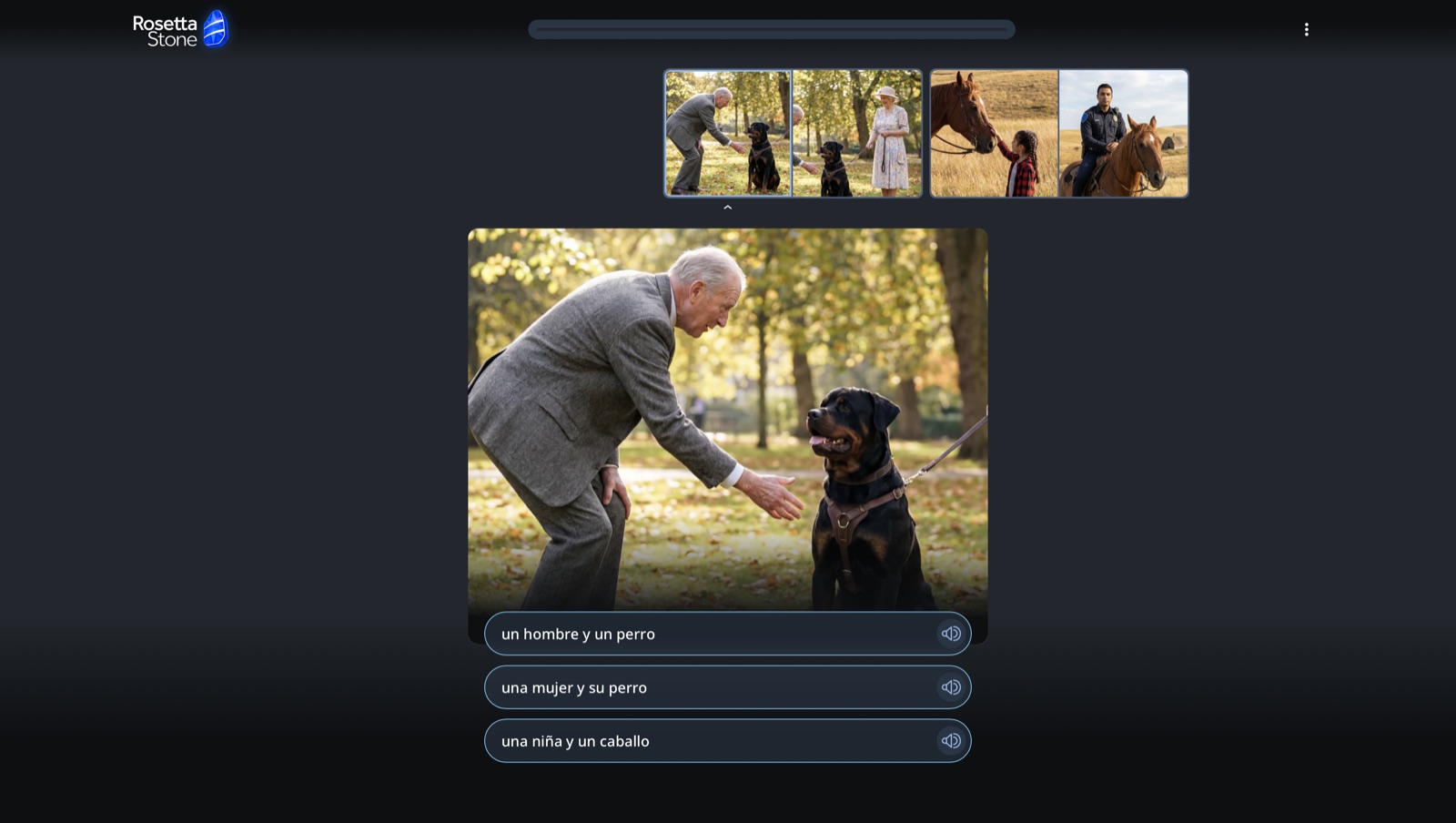
I matched the photo to un hombre y un perro. The picture stuck. It still failed when a photo could have meant two things.
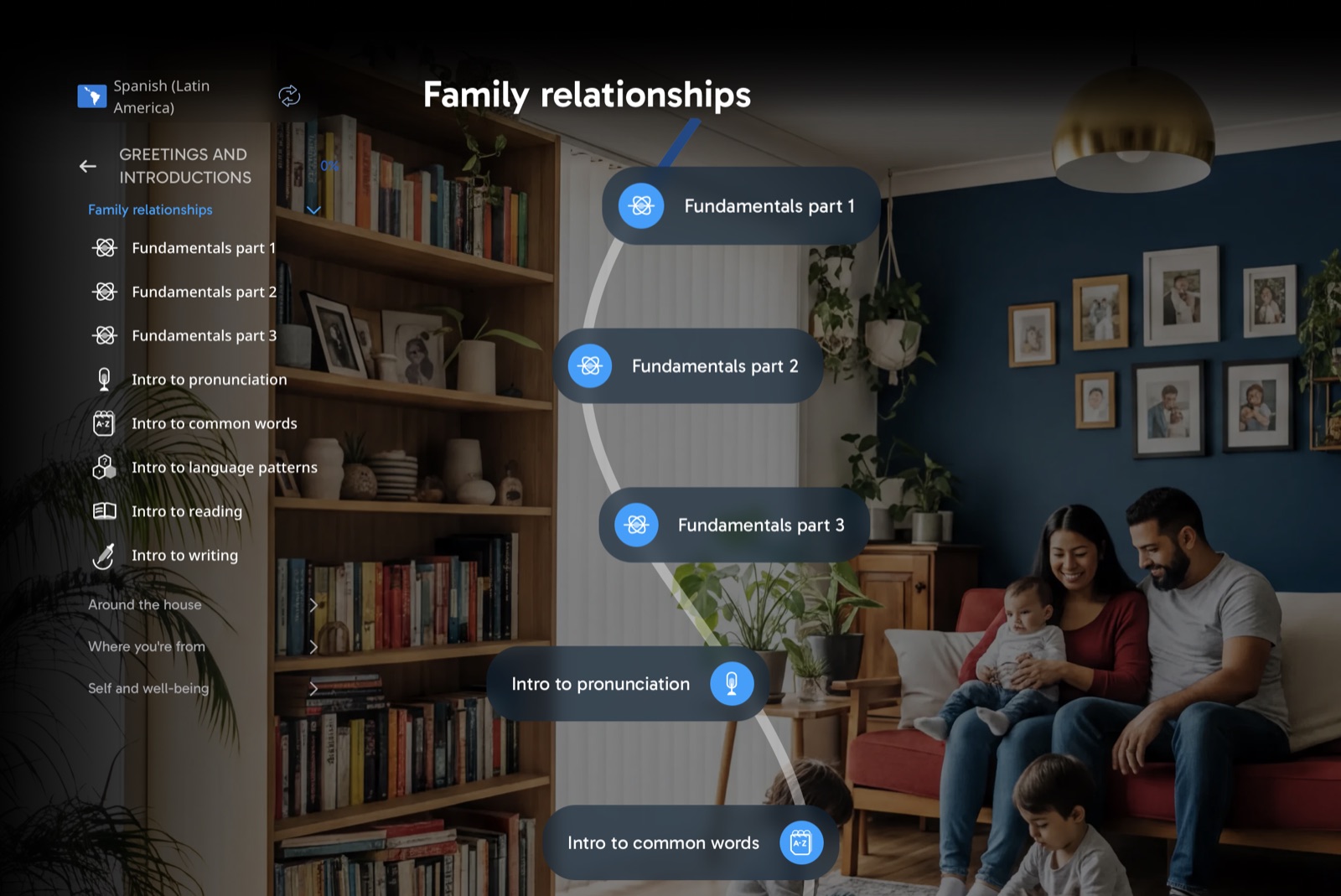
The map made the next lesson obvious. Fundamentals, pronunciation, and common words sat in a line. It also kept me in basics longer than I wanted.
What Rosetta Stone’s Dynamic Immersion Felt Like in Use
Rosetta Stone had more inside it than a typical language app. I got a course path, speaking practice, flashcards, conversation activities, and 25 languages under one plan. Nothing felt randomly stacked. The method still takes a day to trust, because English is not sitting under every line.
Dynamic Immersion is the core. A new phrase arrived with a picture and audio. I saw it, heard it, said it, and only then moved on. That stuck better than a naked word list. It also failed when the photo could have meant two things. Every so often I just wanted the sentence in English, and the app would not give it to me.
Tutoring is what pushed this past the other apps. TruAccent can flag a vowel. It cannot explain why I am flattening it, and it cannot hold a messy conversation. A 30-minute session with a certified tutor can. Those sessions are separate from the regular plan. I still treated them as the reason this feels like a program instead of a game.
Chat Missions were the less serious piece and still useful. Booking a table or making plans gave the phrases a job. I would take that over isolated drills. I would not pretend a mission replaces a person. If you only want a streak and a leaderboard, this course will feel like too much machinery.
| Package | What’s Included | Best For | Price |
|---|---|---|---|
| Monthly | 25 languages, lesson path, Sapphire tools | Trying it first | See Pricing |
| Yearly | 25 languages, lesson path, Sapphire tools | Keeping it long term | See Pricing |
| Tutoring Add-On | Private 30-minute sessions in 5- or 10-session packs | Extra conversation practice | See Pricing |
Rosetta Stone
Rosetta Stone Monthly Subsciption Now Only $19.99
2. Babbel Is Great for Topic-Based Language Courses
Babbel
- I could leave the main path and open travel, business, grammar, or pronunciation on purpose
- Placement testing exists for Spanish, French, Italian, and German, not every language
- Speaking checks sit inside lessons, not in a hidden extra tab
For Spanish, French, Italian, and German, Babbel asked what I knew and parked me in a real level. That saved me from repeating the alphabet. Other languages skip this on-ramp.
Travel, work, grammar, daily life, vocabulary, and pronunciation each had a door. I used those when the main path was teaching a unit I did not need that night.
I had to say the phrase in the lesson, not later in a bonus area. Pronunciation units exist too, so it was not only a pass/fail microphone.
Lessons are practical and a bit dry. If you need leagues and XP to open the app, Babbel will feel like homework. Progress tracking is what pulled me back.
Babbel fits if you want a structured path plus topic side doors, and you will show up without a game layer. Skip it if you want open-ended AI chat as the whole product.
- ✅ Fourteen language courses on one account in my test
- ✅ Recap lessons kept old material from vanishing
- ✅ Podcasts gave me something besides the lesson player
- ✅ Progress tracking made the next step obvious
- ❌ Few games if you rely on that loop to return
- ❌ AI speaking still lacks a long back-and-forth
- ❌ Placement testing is only on some languages
- ❌ Lessons felt like homework when I wanted a streak to pull me back
- Languages: 14 courses on the account I tested
- Placement test: Spanish, French, Italian, and German
- Topic areas: Travel, business, grammar, daily life, vocabulary, pronunciation
- Speaking: In-lesson speech recognition plus pronunciation units
- Extras: Recaps, podcasts, progress tracking
Babbel is the app I opened when I needed a specific skill tonight, not the next unit in a locked story. Placement helped on the big European languages. If you need a game to stay, this will feel plain.
Babbel App Rating
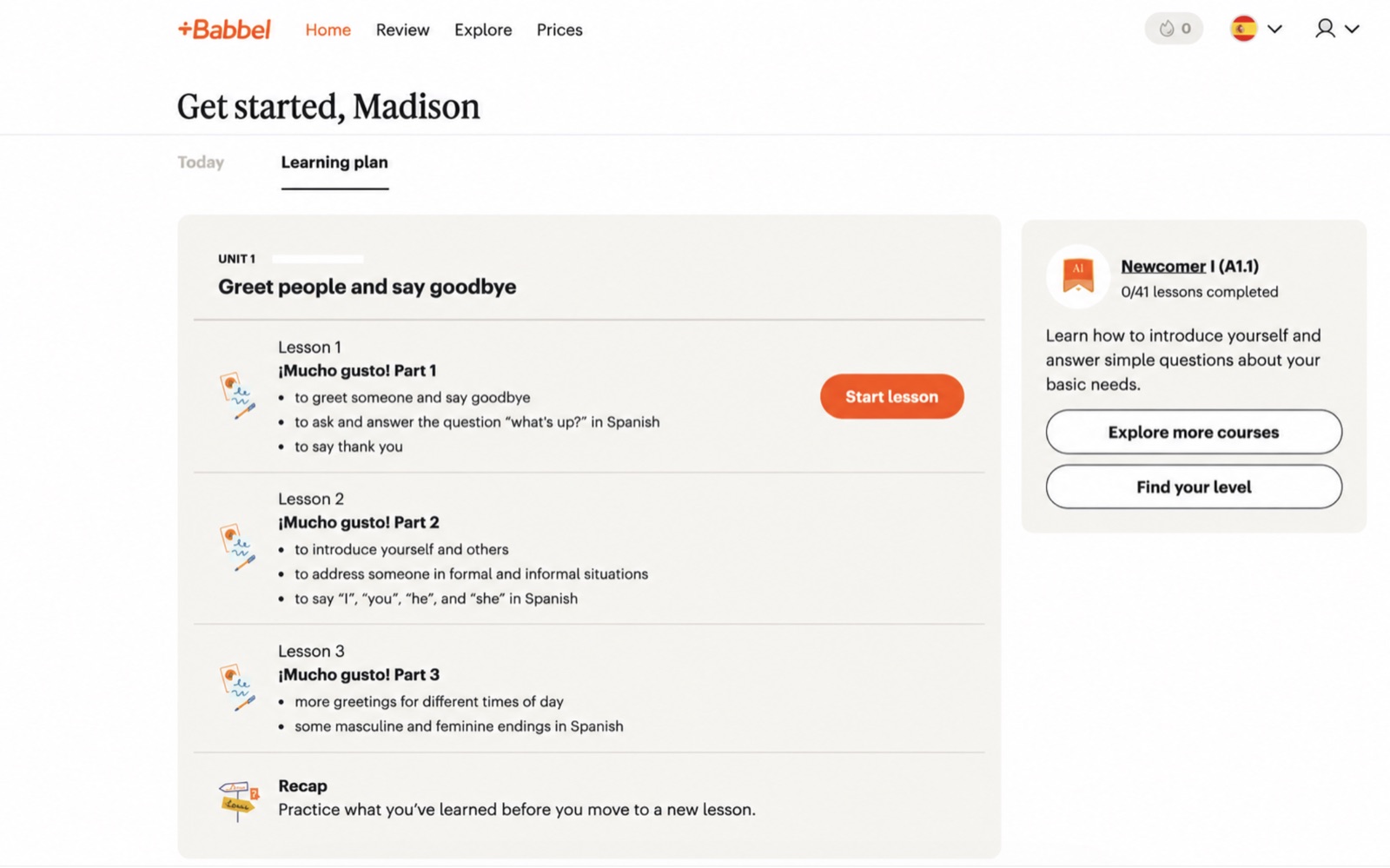
The path listed lessons, a recap, and Explore more courses. Find your level sat on the same screen. That is how I jumped without waiting on the main story.
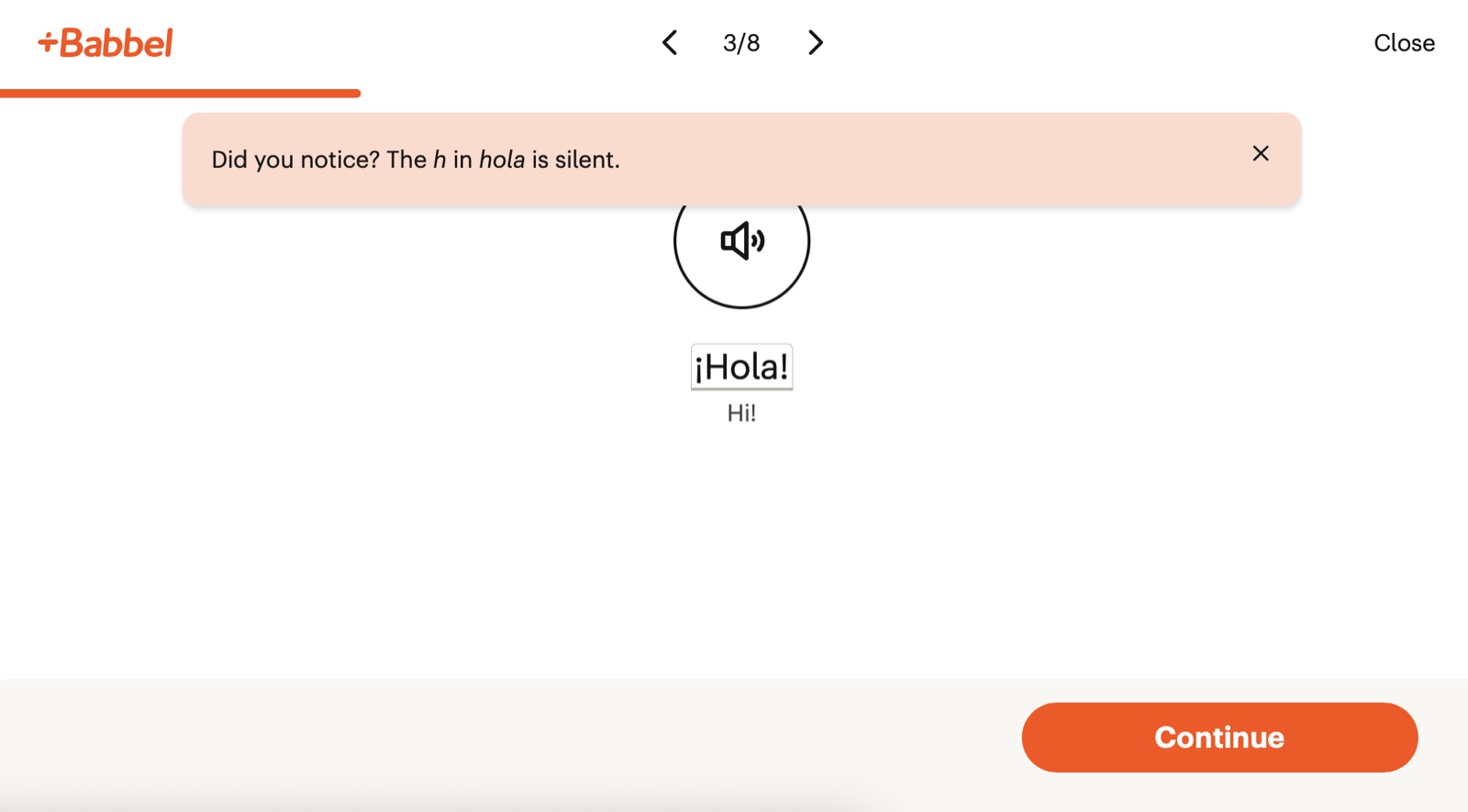
The tip sat on the ¡Hola! screen: the h is silent. Speech lives in the lesson. It is still not a long conversation, and I treated it as pronunciation, not fluency.
When Babbel Let Me Leave the Main Path on Purpose
Babbel did not trap me in one long course and call that a curriculum. The main path still has levels, units, recaps, and a progress bar. I also jumped into travel or grammar when that was the actual job that night. That is the difference I kept using.
The placement test is unglamorous and useful. For Spanish it asked what I already knew and started me in a real unit. I could see recap lessons before I touched the first new screen. The limit is coverage: Spanish, French, Italian, and German get that on-ramp. Other languages do not.
Topic courses are why Babbel earned a card here. Not every topic is equally stocked. Workplace language and culture lessons still went past beginner phrases. Speech recognition lives in the lesson. I said the line, got a check, and moved. It is not a long conversation. It is also not a microphone buried in a settings menu.
If you want a broader method mix around the app, how to learn a new language covers habits that still apply when the lesson is only 15 minutes. Babbel will not nag you with leagues. You have to bring the calendar.
| Package | What’s Included | Best For | Price |
|---|---|---|---|
| Individual Monthly | Language courses, lessons, review, app access | Trying Babbel first | See Pricing |
| Individual Subscription | Language courses, lessons, review, app access | Learning over several months | See Pricing |
| Individual Lifetime | Long-term access to Babbel courses | Keeping access without renewals | See Pricing |
Babbel Review

3. Rocket Languages: Best for Audio-First Study
Rocket Languages
- Level 1 showed an intro module, seven modules, a Survival Kit, and a Benchmark Test with lesson counts visible
- Audio played with transcript, English, speed controls, and an explanation of why the phrase works
- Role Playing sat in the same pharmacy lesson as the audio, so I could take a line after I heard the scene
I opened 13.2 At the Pharmacy, a 27-minute Rocket Russian lesson. Transcript, translation, replay, and a note on давайте as “let’s” all sat under the player.
Role Playing was in the same lesson as the audio. I still had to know which line was mine. That is closer to a conversation than a single microphone check.
A Benchmark Test after Level 1 and a Rocket Certification Exam gave the course an ending. It is Rocket’s certificate, not an official proficiency credential.
Each language is its own course. You cannot share one purchase across Spanish and Japanese. Some languages have fewer levels than others.
Rocket Languages fits if you learn by hearing a whole conversation and then reading why the phrase works. Skip it if you need a live tutor or you want one login for every language in the catalog.
- ✅ Lifetime access on the packages I reviewed
- ✅ Survival Kit with nine practical beginner lessons
- ✅ A 60-day guarantee on qualifying purchases
- ✅ Daily points and streaks if you want a light progress loop
- ❌ Each language is a separate course
- ❌ Some languages stop after fewer levels
- ❌ No live tutoring in the product I tested
- ❌ A 27-minute audio lesson is a long sit if you wanted a five-minute session
- Core lesson: Audio conversation with transcript, translation, and explanations
- Speaking: Role-play from both sides of a scene
- Checks: Benchmark Test plus Rocket Certification Exam
- Beginner extra: Survival Kit with nine practical lessons
- Access: Lifetime access on the packages I reviewed
Rocket Languages is the course I used when a picture was not enough and I needed the English under the audio. Role-play is the speaking piece. Buy the language you will actually finish. This is not a shared library across every tongue in the shop.
Rocket Languages App Rating
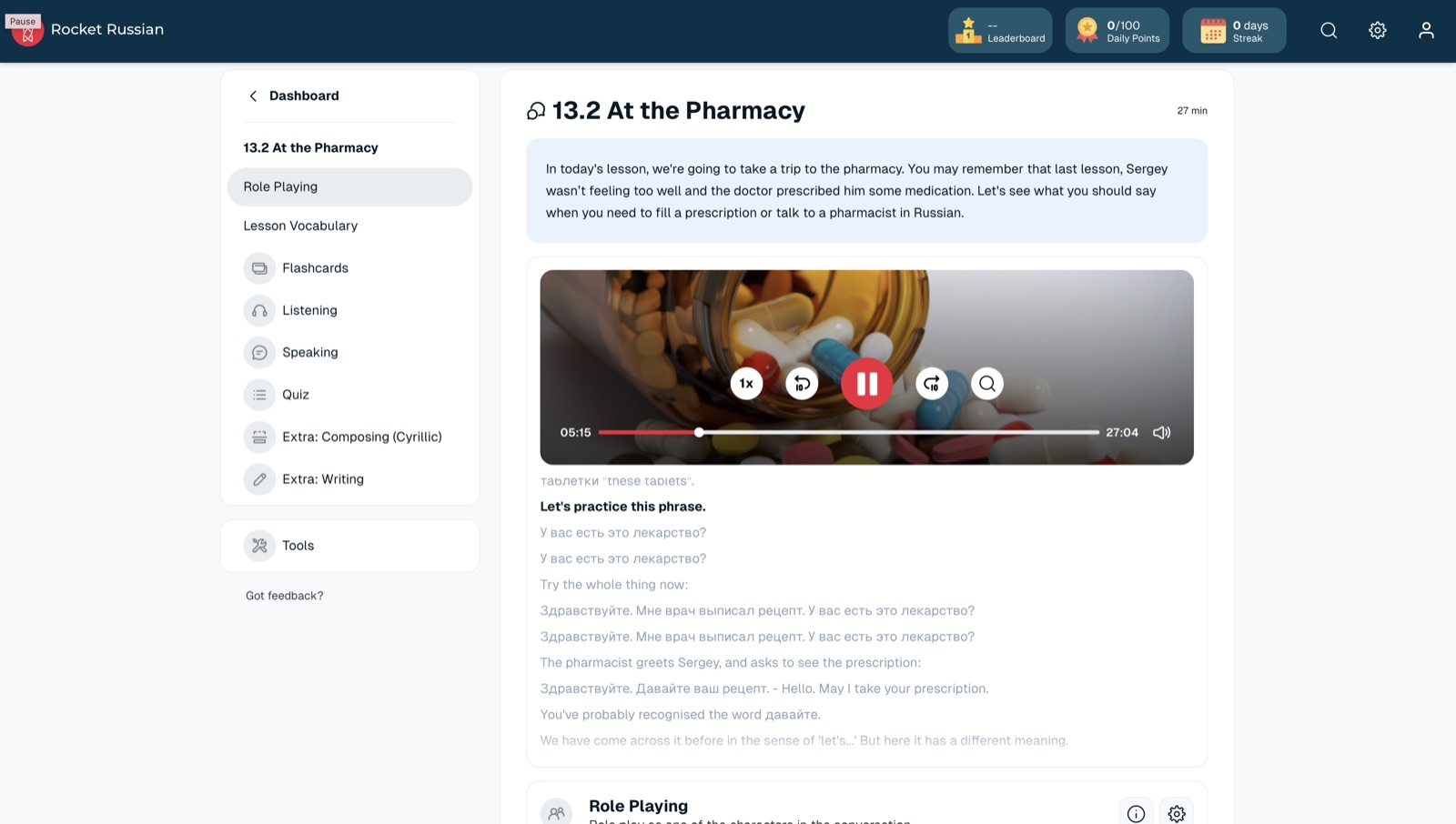
Player, transcript, English, and a why-this-phrase note on one screen. Role Playing sat in the same sidebar. That is the lesson I wish every audio course shipped.
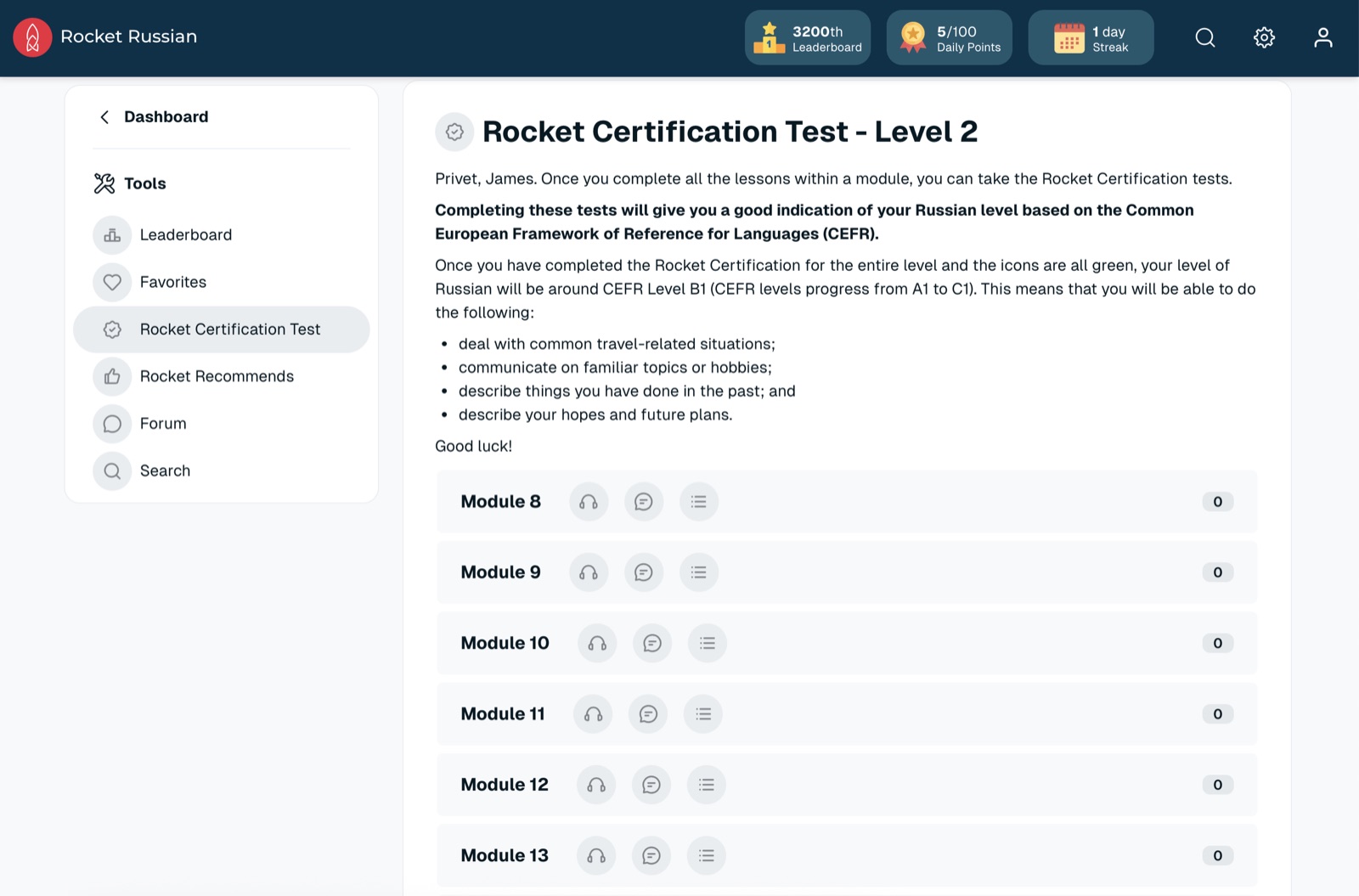
The Level 2 certification test listed modules and pointed at CEFR B1. It gave the course an ending. It is still Rocket’s certificate, not an official proficiency credential.
What Rocket Languages Packed Into the Pharmacy Lesson
Rocket showed me the fullest course map in this test. Level 1 listed an intro, seven modules, a Survival Kit, and a Benchmark Test, each with a lesson count. I knew how much work was there before I tapped blindly.
The pharmacy lesson is the one I keep describing because it is the product. Twenty-seven minutes of audio, then the transcript, the English, speed controls, and a note on давайте as “let’s.” Rosetta Stone would have made me infer that from a picture. Rocket just told me, then sent me into vocab, flashcards, speaking, writing, and a quiz from the same scene.
Role Playing is stronger than a one-line speech check. It sat next to the audio in 13.2 At the Pharmacy. I still had to know which line was mine. That is practice. It is not a tutor.
The finish line helped. I like a benchmark and a final exam even when the certificate is in-house. It gave Level 1 an ending I could point at, instead of an endless lesson list.
| Package | What’s Included | Best For | Price |
|---|---|---|---|
| Level 1 | First course level, lesson tools, lifetime access | Getting started | See Pricing |
| Levels 1 and 2 | Two course levels, lesson tools, lifetime access | Moving past the basics | See Pricing |
| Levels 1, 2, and 3 | Full three-level course, lesson tools, lifetime access | Finishing the full path | See Pricing |
Rocket Languages
4. Speak Is Built for Getting Words Out Loud

Speak
- The plan asked my level, why I was learning, and what I wanted help with, then built a course around that
- I was talking in the first unit, not after a week of tapping bubbles
- Only six languages, and I could not pull the course up on a desktop
Premium Plus built lessons around my goals and the mistakes I kept repeating. Easy phrases I already knew did not keep coming back as filler.
The AI tutor is a conversation partner, not a one-word microphone. I gave it a topic and it kept the exchange going with pronunciation notes as I talked.
I could pick a topic and speak without a script. That is the closest this app got to an actual conversation. It still missed things a person would catch.
Six languages for English speakers, and no desktop classroom. If your language is not there, this card does not apply. If you study on a laptop, same.
Speak fits if you freeze at the microphone and you will live on a phone. Skip it if you need a wide language list, grammar depth, or a desktop course.
- ✅ Skill Check showed where I sat inside the course
- ✅ The profile tracked sentences, study time, and streaks
- ✅ Challenge tab gave me a reason to reopen the app
- ✅ Role-play added a second speaking format besides Free Talk
- ❌ Only six languages for English speakers
- ❌ No desktop course in my test
- ❌ Reading, grammar, and culture stay thinner than the talking tools
- ❌ The AI still missed sounds a person would have stopped me on
- Languages: Six courses for English speakers in my test
- Onboarding: Level, goal, and weak-spot questions that build a personal path
- Speaking: AI Tutor, Free Talk, role-play, pronunciation feedback
- Custom lessons: Made for You lessons on Premium Plus
- Devices: Mobile; no desktop classroom in my test
Speak is the app that made me talk before I felt ready, which is the point. Use it to get sounds out of your mouth. Do not use it as your only grammar teacher, and do not use it if your language is not one of the six.
Speak App Rating
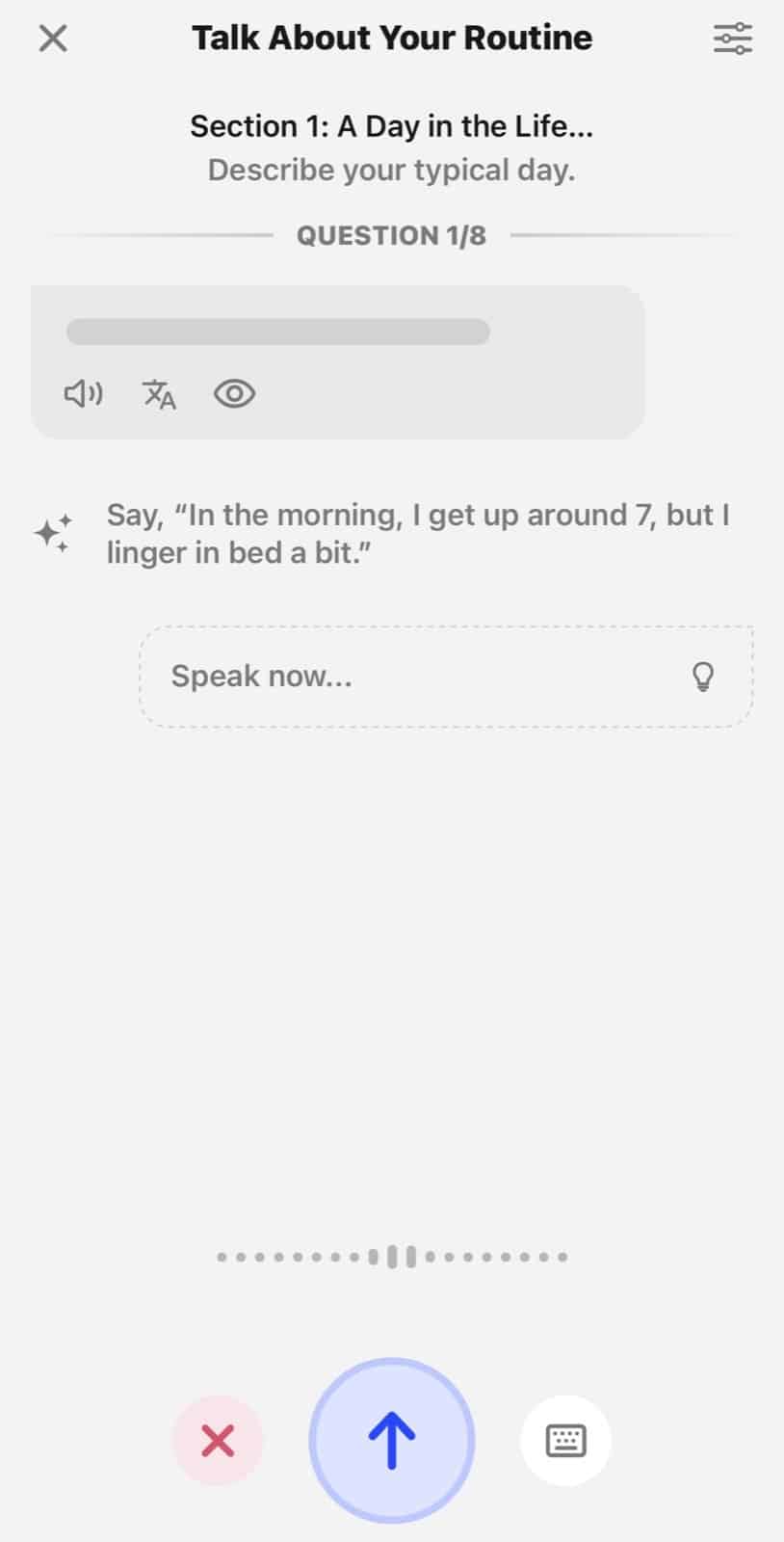
This is the unit that made me talk on day one. A Day in the Life, question 1 of 8, Speak now. No desktop escape.
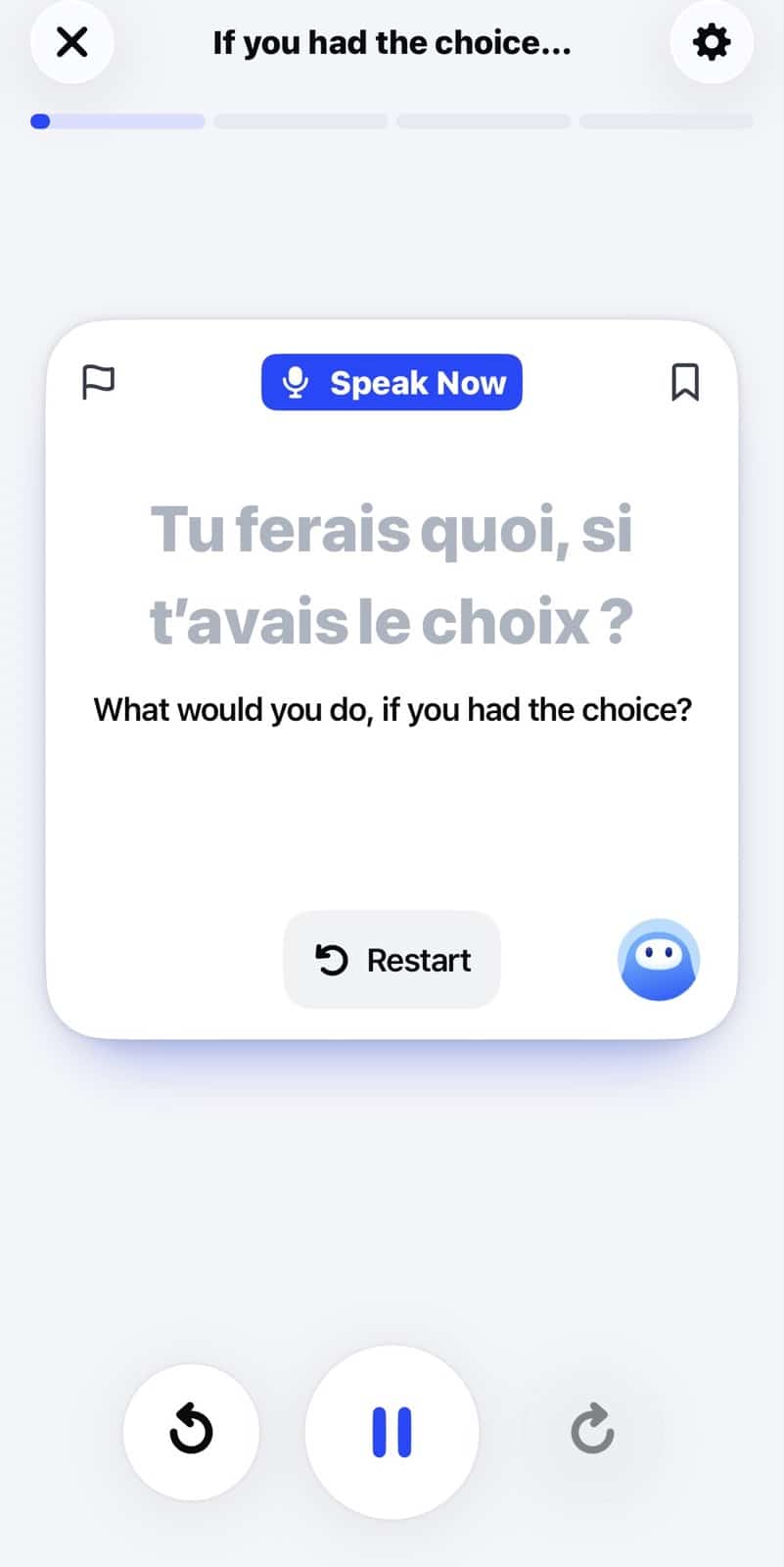
The tutor asked Tu ferais quoi, si t’avais le choix? I had to speak, not tap. That is practice. It still missed things a person would hear.
What Speak’s First Speaking Unit Demanded
Speak asked why I was learning and what I wanted help with, then built a course instead of handing me the same beginner chain everyone else gets. Mine had more than 250 lessons and 2,500 expressions. Dream Out Loud, Talk About Your Routine, and Express Yourself were in the first unit. I was talking immediately.
The AI tutor is not a live teacher and it is not a pass/fail microphone. I gave it a situation. It talked back. I could mess up, retry, and keep going without feeling like I was performing for a class. Free Talk dropped the script entirely. I picked a topic and had to assemble thoughts. That is the skill most tapping apps never demand.
Made for You lessons on Premium Plus chased the mistakes I kept making. Repeating easy phrases does nothing once you already know them. Speak at least tried to stop doing that.
The limits are sharp. Six languages. Phone only. Grammar and culture are thinner. I would pair Speak with a deeper course if I needed reading and structure. I would open Speak first if the problem is that I never actually speak, which is the kind of unscripted use the ACTFL Proficiency Guidelines describe.
| Package | What’s Included | Best For | Price |
|---|---|---|---|
| Speak | AI tutor, Free Talk, role-play, and six languages | Phone speaking practice | SEE PRICING |
| Premium Plus | Made for You lessons plus the talking tools | A personalized speaking path | SEE PRICING |
5. Mango Languages: Best for Hard-to-Find Languages
Mango Languages
- The library includes Cherokee, Latin, Cantonese, and Levantine Arabic alongside the usual European set
- Lessons start with a conversation, break it apart, then rebuild it
- Semantic Color Mapping lines target language up with English by color
If the language is missing elsewhere, Mango is where I looked. French and Japanese are here. So are Cherokee, Latin, Cantonese, and Levantine Arabic.
A conversation arrives whole, then splits into words and grammar, then rebuilds. Literal meaning sits next to natural meaning when they diverge.
Matching colors showed which chunk of English lined up with which chunk of the target sentence. Useful on a language with a different word order.
The dashboard is plain. I did not look forward to opening it. The teaching still worked. Fun is not the product.
Mango Languages fits if the language you need is missing from the bigger apps, and you will tolerate a plain dashboard. Skip it if you need games, topic side doors, or a talk-heavy AI tutor.
- ✅ More than 70 languages, including several the others skip
- ✅ Daily Review kept old lessons from disappearing
- ✅ Grammar and culture notes sit inside the lesson
- ✅ Family access covers up to five profiles
- ❌ The dashboard is dull to look at
- ❌ Almost no game-like practice
- ❌ Fewer ways to branch into topics than Babbel
- ❌ Speaking tools stayed thinner than a tutor or a dedicated talking app
- Library: 70+ languages
- Method: Intuitive Language Construction: conversation, breakdown, rebuild
- Visual aid: Semantic Color Mapping
- Review: Daily Review plus chapter recaps
- Profiles: Individual plan or family access up to five people
Mango is the app I would open for a language the other four do not carry. The lessons are serious and a little dry. If French or Spanish is the goal and you want energy, use one of the other classrooms. If Cherokee or Cantonese is the goal, start here.
Mango Languages App Rating
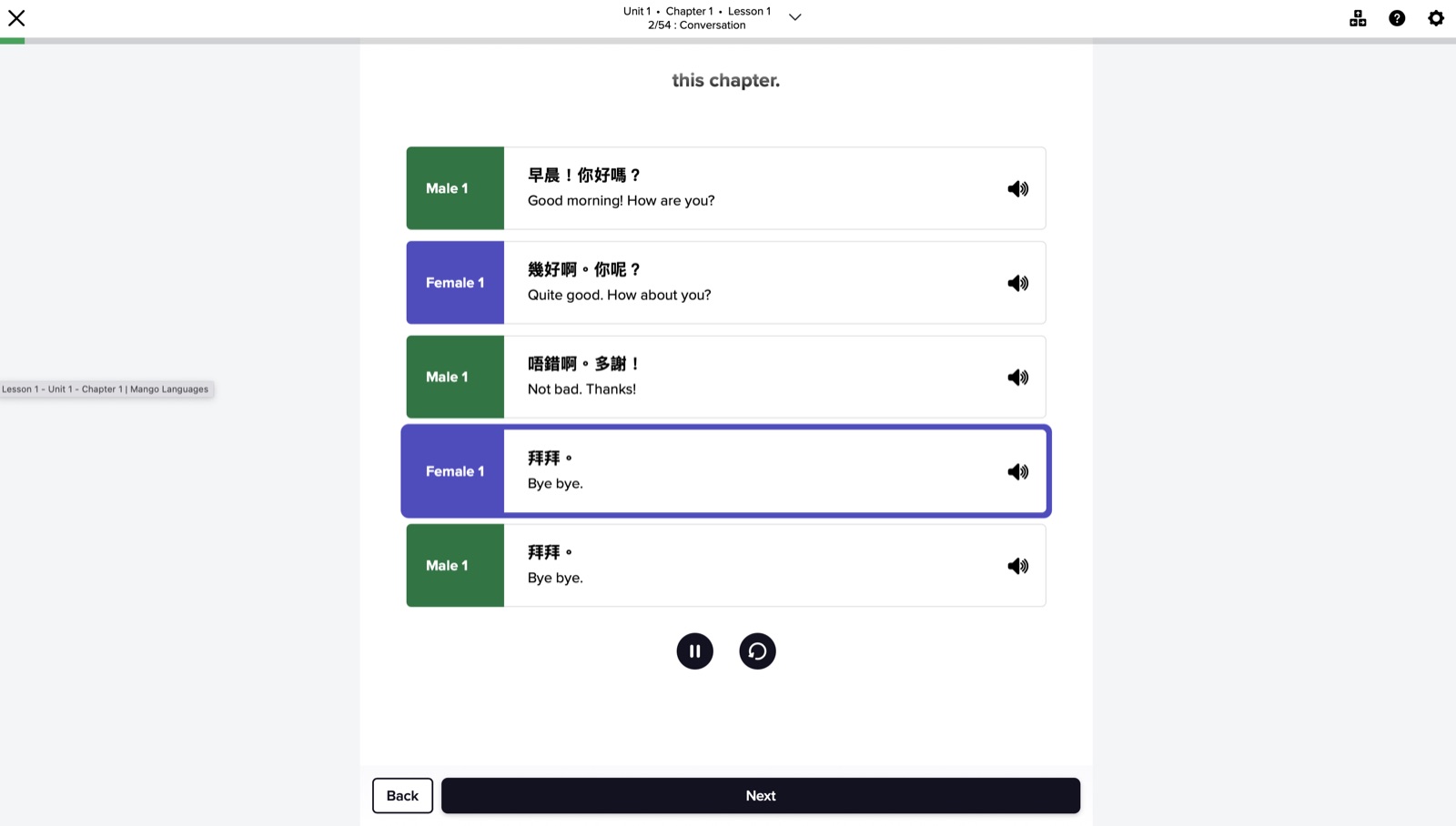
A real Cantonese conversation, with male and female lines and English under each. This is why Mango is here: the language existed, not as a stub.
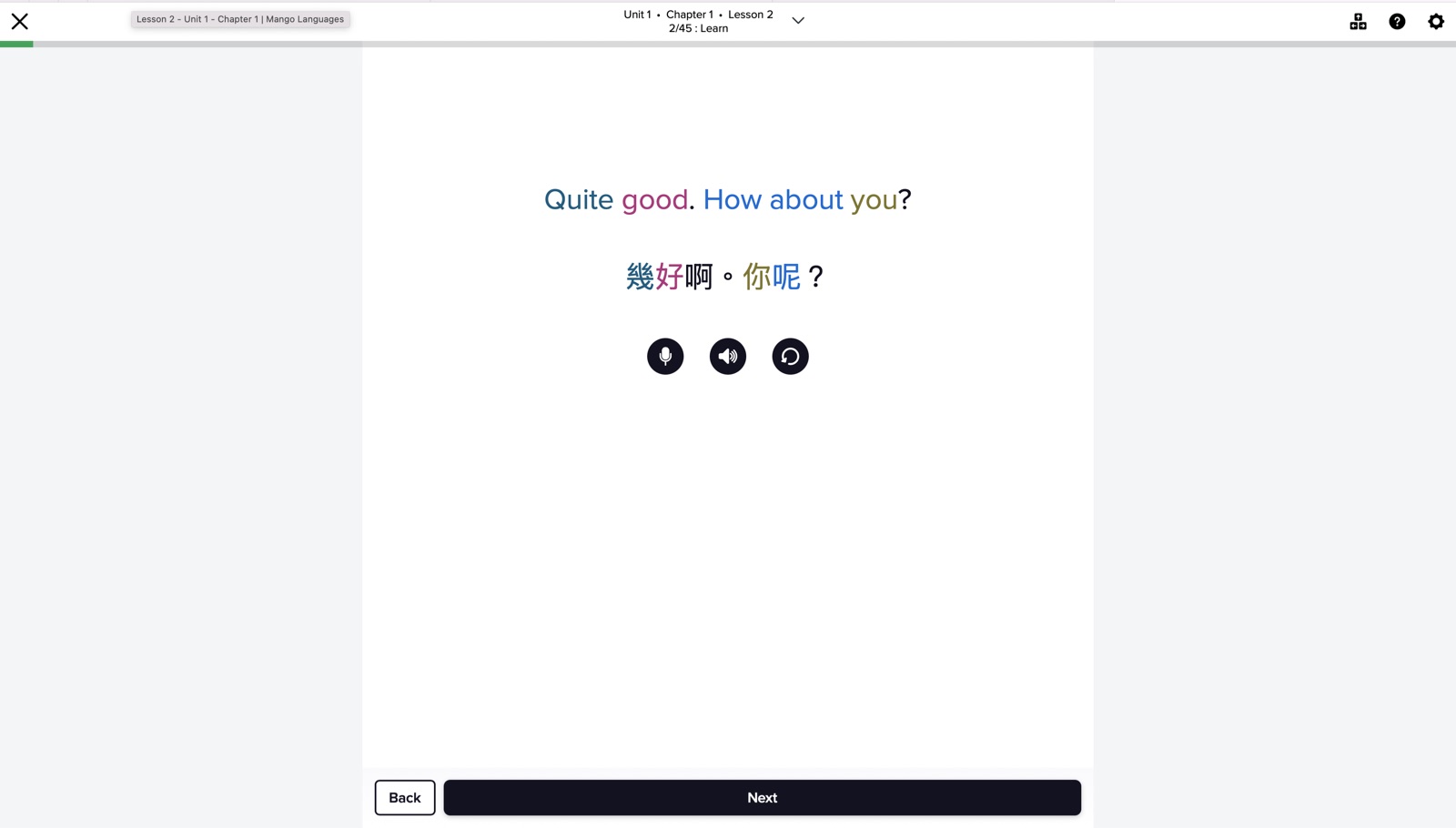
Colors tied English chunks to 幾好啊。你呢? I used that on word order. I did not use it for fun.
What Mango Languages Showed in the Cantonese Unit
Mango’s library is the reason it is on this page. I found the usual set, then Cantonese, Cherokee, Latin, and Levantine Arabic. When a language is scarce, course chrome matters less than whether the course exists.
Intuitive Language Construction is a clear loop. Conversation first. Then the pieces. Then the conversation again, with grammar and culture notes still on the same screen. Literal translation appears when it disagrees with the natural meaning, which stopped me from learning an English-shaped sentence that no one would say.
Semantic Color Mapping is the visual trick. Color links a chunk of English to a chunk of the target language. That helped on sentence order without turning the unit into a syntax lecture. It is smart. It is also not pretty. I never opened Mango because I was excited to see the dashboard.
Ethnologue’s language count is a reminder that most apps cover a sliver. Mango covers more of that sliver than the others here. It still lacks Babbel-style topic doors. I would use it for the language, not for the vibe.
| Package | What’s Included | Best For | Price |
|---|---|---|---|
| Individual Plan | 70+ languages, lessons, vocabulary, and review tools | One learner | SEE PRICING |
| Family Plan | 70+ languages, lessons, vocabulary, and review tools for five profiles | Families or shared access | SEE PRICING |
Which Learner Are You?
I want one program with room to grow. Use Rosetta Stone for the course path, Chat Missions, and a tutor when you want a person.
I need one skill tonight. Use Babbel. Topic courses open travel, work, grammar, or pronunciation without waiting on the main story.
The language I want is never in these apps. Check Mango Languages. The library is the product.
I learn when I hear the whole scene. Rocket Languages keeps audio, transcript, translation, and the why on one screen.
I freeze instead of talking. Open Speak. You will be speaking in the first unit.
Other Language Apps I Still Use
- Duolingo is the game loop. Streaks and leagues will get you to open it. They can also turn into point-chasing. See our Duolingo explainer before you treat it as a full course.
- Pimsleur is audio you can use while walking or driving. It repeats on purpose. It gets thin when you want a screen.
- Busuu adds community feedback on speaking and writing. Useful when someone replies. Uneven when they do not.
- Memrise uses videos of native speakers. Better for listening than for deep grammar.
- LingoDeer explains sentence patterns, especially for East Asian languages. Structured, not exciting.
Final Verdict
Rosetta Stone is the full course I would reopen for a long path. Babbel is the topic-course app. Rocket Languages is the audio classroom with explanations. Mango Languages is the wide library. Speak is the microphone. Match the job. A loud ad is not a reason to stay.
FAQs
Which language learning app should I use?
Use the one that matches the job. I used Rosetta Stone as a full course, Babbel for topic doors, Rocket Languages for audio, Mango for rare languages, and Speak to talk out loud.
Which language app is strongest for speaking?
Speak is the one that made me talk in the first unit, with an AI tutor and Free Talk. Rosetta Stone adds a human tutor if you want a person. Rocket Languages role-play is the middle ground: a scripted scene, both sides.
Which language app has the most languages?
Mango Languages has the largest library here, with more than 70 languages, including Cherokee, Cantonese, Latin, and Levantine Arabic. Speak has six. That gap matters more than any other feature if your language is scarce.
Is Rosetta Stone better than Babbel?
They do different jobs. Rosetta Stone is a visual course path with Chat Missions and optional tutoring. Babbel is a structured path plus topic courses for travel, work, grammar, and pronunciation. I would not swap them just to chase a headline.
Are paid language apps worth it?
They are when you get a course path, review tools, and speaking practice that lasts past the first two weeks. A free streak app can still be the daily opener. It is a weak only plan if you never leave tap-the-bubble mode.
How long should I use a language app each day?
Fifteen to 30 minutes is enough if you keep showing up. Mix lessons with listening and speaking out loud. Tapping answers alone will not move a conversation skill. Classroom hours to professional proficiency are a different clock, which is what the State Department language training timelines show.

![Rocket Languages Promo Code [Verified 2026 Discounts]](https://www.miamiherald.com/careers-education/wp-content/uploads/sites/2/2026/07/rocket-languages-coupon-1-1024x768.jpg)
![Rosetta Stone Discount Promo Code [Verified Coupons]](https://www.miamiherald.com/careers-education/wp-content/uploads/sites/2/2026/07/rosetta-stone-discount-1024x768.jpg)