You don’t have to be famous, controversial, or chronically online to worry about how to prevent doxxing.
Because sometimes, all it takes is one angry stranger and a few breadcrumbs. A username leads to an old account. That account reveals your real name. Your real name leads to a people-search site. Suddenly, someone who started with a comment you posted knows where you live.
The problem is, you can’t make yourself impossible to find online. But you can make that trail a whole lot harder to follow.
Here are five steps to keep yourself safe from doxxing.
Key Takeaways
- Protect Your Address First: Your home address is one of the most important pieces of information to keep away from strangers online.
- Break the Trail: Don’t make it easy to go from an anonymous username to your real name and then your real-world location.
- Remove Easy Sources: People-search sites can expose addresses, phone numbers, relatives, and other identifying details.
- Watch Your Posts: Photos, tags, routines, and location clues can reveal more than you intended.
- Save the Evidence: If someone threatens to dox you, document the threat before blocking, reporting, or taking other action.
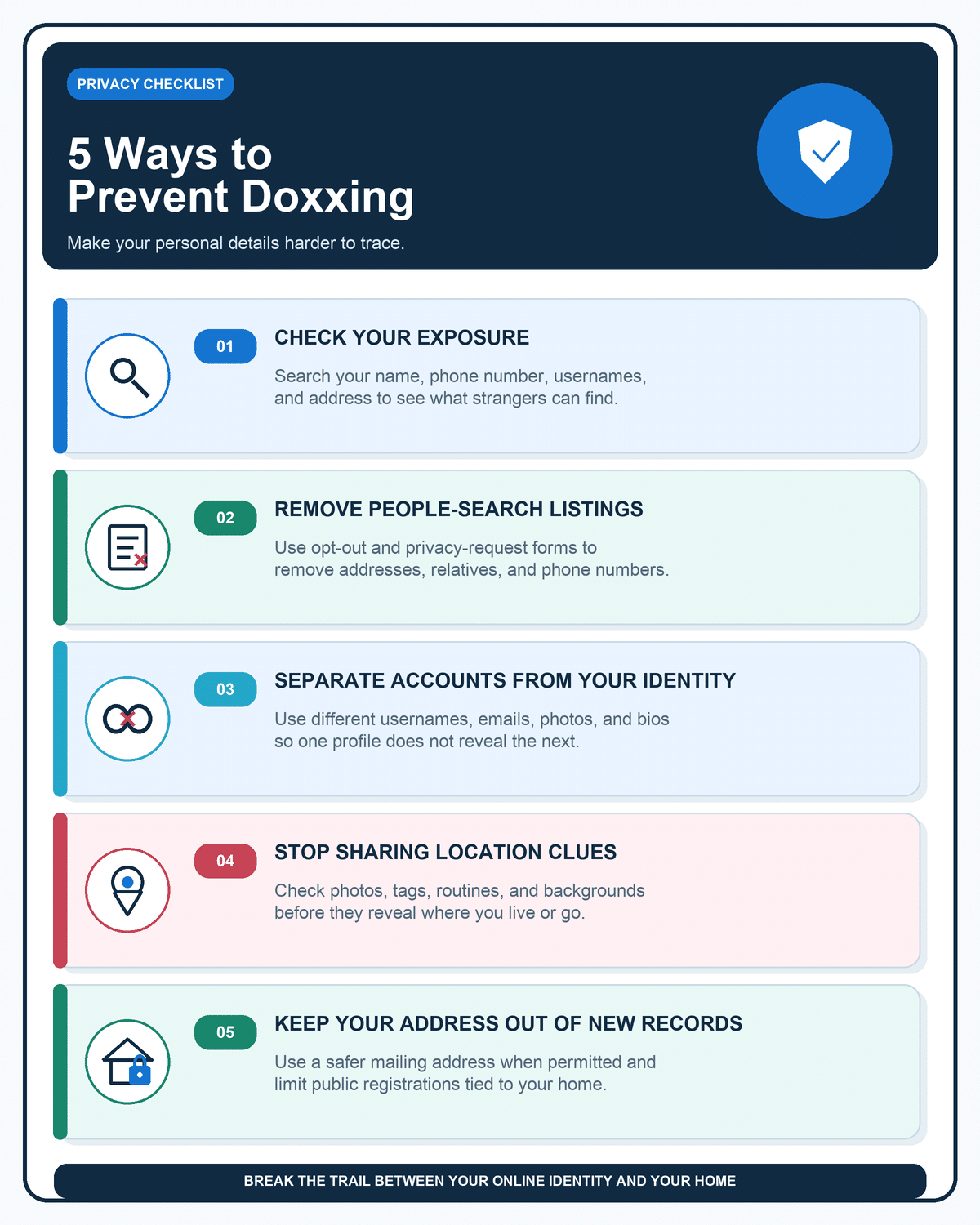
1. Check How Easy It Is to Find Your Home Address

Here’s a useful test: how many clicks does it take to get from your name to your address?
Start with Google, then check people-search sites. Search your full name with your city or state, and try your phone number too. If you use the same username across multiple accounts, search that as well.
You’re not looking for every random mention of yourself online. You’re looking for the pieces that could lead someone to your home.
Pay Special Attention to These Results
- ⌖Your current or past addresses
- ☎Your phone number
- ♧Relatives or household members
- ▣Your employer
- ⌖Your city or neighborhood
Google’s Results about you tool can also flag eligible search results containing personal details like your address, phone number, or email and let you request removal.
If your address comes up quickly, that’s your first problem to fix. The harder someone has to work to connect your online presence to your home, the better.
2. Get Your Address Off People-Search Sites

This is one of the highest-value things you can do if your main concern is doxxing.
Search your name on people-search sites and see whether your current address, old addresses, phone number, or relatives show up. If they do, look for an opt-out, remove my information, or privacy request link.
A lot of these sites let you remove your listing for free, although the process varies. Some make it easy. Some make you feel like you’re applying for a mortgage just to delete your own phone number.
If the site doesn’t have an obvious form, send them a direct removal request.
You can use something like this:
Personal Information Removal Request
Hi,
I’m requesting the removal of my personal information from your website. The listing includes information associated with me, including my home address and/or other identifying details.
Listing URL:
[PASTE URL]
Name shown on listing:
[YOUR NAME]
Please remove this listing and any publicly displayed personal information associated with it.
Thank you.
Save the page URL before you submit anything so you can check it again later.
And do check again later. These listings can sometimes reappear as databases are refreshed, so removal isn’t always permanent.
If the page itself gets taken down but still appears in Google, you can also request removal of certain personal information from Google Search. Just keep in mind that removing a search result and removing the original page are two separate things.
3. Break the Link Between Your Accounts and Real Identity

This one is easy to overlook.
Say you post anonymously on Reddit under `GreenTiger92`.
No real name. No photo. Great.
Except you also used `GreenTiger92` on an old gaming forum where you mentioned your college. And on another account where your profile photo matches your personal Instagram.
Now your “anonymous” username isn’t really all that anonymous.
You don’t need a completely different identity for every website. But if you have accounts you specifically don’t want connected to your real life, don’t reuse obvious identifiers across them.
That can mean using:
- @Different usernames
- ✉Separate email addresses
- ▣Different profile photos
- ☰Bios that don’t repeat the same identifying details
I’d be especially careful with accounts where you discuss controversial subjects, interact with strangers, stream, game publicly, or have a large audience.
4. Stop Posting Clues That Reveal Where You Live

Most people know not to post their full street address.
But little clues can add up.
A photo from your apartment balcony might show a recognizable building. A package on the counter might have a shipping label. A gym selfie tells people where you regularly go. A post about grabbing coffee at the same place every morning starts establishing a routine.
And you’d be surprised how easy it is for a determined netizen to track someone down.
In 2017, 4chan users famously tracked down the location of Shia LaBeouf’s “He Will Not Divide Us” flag using clues like stars, airplane flight paths, contrails, and even sounds from the livestream.
You’ll Want to Pay Particular Attention To:
- ⌖Street signs
- ✉Mail and shipping labels
- ⌂Apartment or house numbers
- ▤License plates
- ▣School or workplace badges
- ⌂Views from your home
- ◷Regular check-ins
- ◎Live location sharing
Your friends and family matter here too.
You might never tag your apartment building, but your friend could post, “Birthday drinks at Sarah’s new place!” with the location attached.
It’s worth checking who can tag you, whether tagged posts need approval, and who can see your location.
I also wouldn’t post your exact location publicly while you’re still there unless there’s a good reason to.
5. Stop Putting Your Home Address Into New Public Records

This gets at something the other sections don’t: preventing your address from becoming searchable in the first place.
Depending on what you do online or professionally, your home address can wind up attached to things like:
- ▣Business registrations
- ◉Public-facing seller profiles
- ⌘Domain registrations
- ▤Creator or business contact pages
- ⌂Return addresses
- ☷Professional directories
When you have a legitimate alternative, consider using a PO box, private mailbox, business address, or other appropriate mailing address instead of your home.
Obviously, there are situations where you’re legally required to provide your real residential address. The point isn’t to put fake information on official forms. It’s to stop casually using your home address in places where it could become public when you had another option.
What to Do If Someone Threatens to Dox You
If someone threatens to post your address or other personal information, save the evidence before you do anything else.
Take screenshots and keep usernames, links, dates, and messages. Then report the account or post, secure any accounts that may be at risk, and remove exposed information where you can.
If your address appears in Google Search, you may also be able to request removal of eligible doxxing content.
Most importantly, take credible real-world threats seriously. If someone publishes your address and threatens to come to your home, contact law enforcement or emergency services as appropriate.
Final Verdict
You don’t have to delete your entire online presence to stay safe from doxxing; you just need to make it more difficult.
Basically, it’s about removing the shortcuts.
Start with the obvious stuff: see what comes up when you search your name, remove your address where you can, and be more careful about which accounts lead back to your real identity.
You don’t need to make yourself impossible to find. You just don’t want a random person online to be able to figure out where you live with a couple of searches and five spare minutes.
If a listing already names you, read what BeenVerified shows so you know what a people-search report can expose.
If listings are already up, how to remove personal information from the internet covers Google tools, people-search opt-outs, and old accounts.
FAQs
What information is commonly used for doxxing?
Doxxing can involve home addresses, phone numbers, email addresses, legal names, workplaces, relatives, photos, and other identifying details. The specific information varies, but a home address is particularly concerning because it can turn online harassment into a real-world safety issue.
Can someone dox you with just your username?
A username alone may not identify you, but reused usernames can help someone connect accounts across different websites. If one of those accounts reveals your real name, location, photo, or other details, the trail can become much easier to follow.
Does using a VPN prevent doxxing?
No. A VPN can help conceal your IP address from some parties, but it won’t remove your address from public records, hide information you’ve posted publicly, or stop someone from connecting your usernames across accounts.
Can you remove your address from the internet?
You can often remove your address from people-search sites and request removal of eligible Google Search results. But you may not be able to erase every copy, especially if the information comes from public records.
What should you do if someone threatens to dox you?
Save screenshots and other evidence, secure your accounts, report the user and content, and begin removing exposed information. If the threat includes credible violence, stalking, or immediate danger, contact law enforcement.

![Hosting.com Coupon Discounts [Verified October 2026 ]](https://www.miamiherald.com/careers-education/wp-content/uploads/sites/2/2026/10/hosting-com-promo-code-mh-1024x768.jpg)
![Bluehost Promo Codes and Discounts [Verified Coupons]](https://www.miamiherald.com/careers-education/wp-content/uploads/sites/2/2026/10/bluehost-promo-code-mh-1024x768.jpg)
![Incogni Promo Codes [Verified Discounts]](https://www.miamiherald.com/careers-education/wp-content/uploads/sites/2/2026/10/incogni-promo-code-mh-1024x768.jpg)
![Shopify Promo Codes [Verified Discounts]](https://www.miamiherald.com/careers-education/wp-content/uploads/sites/2/2026/10/shopify-promo-code-mh-1024x768.jpg)