
Choosing the best portable monitor means more than just grabbing the sleekest model off the shelf. A portable monitor is a major investment, and with all the options out there, it’s key to zero in on the features that truly matter to your needs.
Here’s what to keep in mind:
- Size & Resolution: Larger screens are great for productivity, but smaller ones strike a better balance between portability and screen space. Consider how you’ll be using the monitor and how much bag space you have.
- Connectivity: USB-C offers the most convenience, but having standard HDMI and even DisplayPort options increases the range of devices you can connect.
- Image Quality: Sharp resolution, vibrant color reproduction, and a wide viewing angle (thanks to IPS panels) make for a more enjoyable viewing experience.
- Bonus Features: Touchscreens, refresh rates (ideal for gamers), built-in speakers, and kickstands add to the overall functionality of the monitor.
Want to find the perfect portable screen companion for your work, gaming, and entertainment? Explore our top Amazon picks for 2024 below.
Best For On-the-Go Productivity: ASUS ZenScreen Portable Monitor

Key Specs: 15.6-inch Full HD IPS display, landscape or portrait mode, ultraslim design, anti-glare, blue-light filter, touchscreen, USB-C & USB-A support, kickstand, tripod mount
Need an extra screen without the extra bulk? The ASUS ZenScreen could be the perfect travel companion. It’s incredibly slim and portable, making it easy to toss in a bag. Even better, you won’t need a separate power supply thanks to its clever USB-C and USB-A compatibility that even works with smartphones.
Pros
This portable laptop screen wins major points for its ease of use. Not only is it the best monitor in its class, but setup is a breeze. Its compatibility with a wide range of laptops and devices means you won’t be fussing with endless adapters.
The touchscreen and intuitive kickstand design add to the convenience, especially for on-the-go presentations or multitasking. And while it isn’t a 4K monitor, it can handle 4K content with ease.
Cons
While the ZenScreen is great for general productivity, it might not be the top choice for serious creative work or gaming. The image quality, while decent, isn’t as sharp or color-rich as some higher-end portable monitors.
Best For Boosting Productivity On the Go: ViewSonic Portable Monitor

Key Specs: 15.6 inches, 1920 x 1080 pixels (Full HD), 60Hz refresh rate, 250 nits, IPS, anti-glare, blue light filter, frameless, flicker-free, built-in speakers, USB-C connectivity
The ViewSonic Portable Monitor is a perfect, lightweight solution for extending your laptop’s display on the move. It boasts a vibrant IPS panel and multiple connection options, including mini-HDMI and USB-C, for flexible setup with various computers and devices.
Pros
This 15.6-inch portable monitor offers clear visuals thanks to its Full HD resolution and IPS panel, ensuring a great color gamut and viewing angles. It even includes eye-care features like a blue light filter and a flicker-free display to reduce strain during long working sessions.
The USB-C connectivity is also a huge plus, allowing you to transmit video, audio, and power through a single cable, keeping your workspace clutter-free.
Cons
While this monitor offers great value, the screen’s brightness might be an issue if you’re trying to work in brightly lit outdoor spaces. Additionally, since it doesn’t have a touchscreen, you’ll still have to rely on your laptop’s touchpad or an external mouse for navigation.
Best For Gamers and aNyone Who Craves More Screen Space: VisionOwl Large Portable Monitor

Key Specs: 18.5-inch 120% sRGB FHD IPS display, 100Hz refresh rate, built-in speakers, blue light filter, VESA mountable, super slim
Want a bigger view but hate a bulky setup? The VisionOwl has your back. This sleek monitor offers a generous screen size without weighing you down. It’s perfect for slipping into your bag when you need extra workspace on the go or want to set up a mini gaming haven anywhere.
Pros
If you’re seeking a smooth, immersive experience for gaming on the go, this could be the monitor for you. From Sony PlayStation to Nintendo Switch, your gaming consoles will work like a charm.
The high refresh rate makes games feel fluid and responsive, helping you keep up with fast-paced action. Additionally, the larger screen size lets you see more of the action without squinting, and the vibrant IPS display makes colors pop. It’s the perfect portable gaming monitor.
Cons
This monitor might not be the top pick for professional photo or video editing, where color accuracy is crucial. Also, those built-in speakers sound decent, but you’ll want to pack your gaming headphones for the best audio experience.
Best For Anyone Needing a Versatile, No-Fuss Second Screen: Arzopa Portable Monitor

Key Specs: 15.6 inches, 1920 x 1080 pixels (Full HD), 60Hz refresh rate, IPS, anti-glare, dual USB-C ports, mini-HDMI
If you want to expand your workspace without breaking the bank, the Arzopa Portable Monitor is a solid contender. It offers a spacious 15.6-inch IPS screen, simple plug-and-play connectivity, and a slim, travel-friendly design. Whether you’re editing documents, browsing websites, or even catching a quick gaming session, this second screen steps up to the task.
Pros
This budget monitor delivers a clear and vibrant picture thanks to its Full HD resolution and IPS panel. The anti-glare coating also helps minimize distracting reflections. Furthermore, the dual USB-C ports and a mini-HDMI input offer wide compatibility with laptops, gaming consoles, and even some smartphones — perfect for those who switch between devices often.
Cons
With this monitor, don’t expect advanced features like a high refresh rate or touchscreen functionality. Additionally, some users might find the colors to be less accurate than on pricier portable displays.
Best For Budget-Minded Multitaskers and Casual Gamers: KYY Portable Monitor

Key Specs: 15.6-inch FHD IPS display, dual USB-C ports, mini-HDMI, built-in speakers, smart cover, eye-care technology
If you’re in the market for a no-frills second screen that does the job at a reasonable price, KYY’s Portable Monitor might be your match. It’s all about simple, convenient expansion of your workspace on a budget or maybe a quick way to get a bigger screen for some casual gaming fun.
Pros
This monitor is surprisingly easy on the eyes thanks to its flicker-free tech and blue light filter, a big plus if you spend hours staring at a screen. It’s also incredibly versatile — all those ports mean it can connect to almost any laptop, smartphone, or even your gaming console for a quick play session on the go.
Cons
The KYY isn’t winning any awards for color accuracy, so it might not be the best choice for those doing serious photo editing. It also doesn’t have the snappiest refresh rate, which could lead to some choppiness in fast-paced games.
Best For the Work-From-Anywhere Professional Who Wants Flexibility: Cocopar Portable Monitor

Key Specs: 15.6 inches, 1920 x 1080 (Full HD), 60Hz refresh rate, IPS panel, anti-glare, blue light filter, VESA mountable, frameless, flicker-free, built-in speakers
Looking to level up your laptop life? The Cocopar Portable Monitor is a versatile choice for ditching the single-screen setup. With sharp visuals, easy connectivity, and the ability to be wall-mounted, this monitor adapts to your work style — whether that’s at a desk or using your favorite coffee shop as a temporary office.
Pros
The Full HD resolution and IPS screen deliver crisp images and colors that are easy on the eyes, thanks to the anti-glare and blue light-reducing features.
Plus, the option for both USB-C and mini-HDMI connections means you can hook it up to most laptops, phones, or even gaming consoles for some impromptu downtime. The best part? It’s VESA mountable, letting you switch between a traditional setup and a more ergonomic vertical screen whenever you like.
Cons
This monitor won’t satisfy hardcore gamers who crave super-high refresh rates or those needing the absolute best color accuracy for graphic design. And while lightweight, it’s not the slimmest portable monitor out there.
Best For Lots of Options: UPerfect Portable Monitor

Key Specs: 15.6-inch FHD IPS display, HDR, standard HDMI, dual Type-C, VESA mountable, built-in speakers
The best budget monitor goes to UPerfect. This one makes it easy to say “yes” to whatever device you want to connect. It’s got a ton of ports, including standard HDMI (a rarity for portable monitors), that makes it easy to hook up older laptops, gaming consoles, and anything else you might have on hand.
Pros
This monitor works with almost any gadget you throw at it, thanks to its versatile connectivity options. The full-sized HDMI port is a big plus for those who want zero fuss when connecting an older device. It also delivers decent image quality and comes with surprisingly punchy speakers for its size.
Cons
The UPerfect, unfortunately, doesn’t excel in any one area. It’s great for everyday use but might not be the top pick for gamers who need the fastest refresh rates or creatives who depend on precise color reproduction.
Best For Budget-Minded Travelers and Multitaskers: MNN Portable Monitor

Key Specs: 15.6 inches, 1920 x 1080 (Full HD), 60Hz refresh rate, IPS display, HDR mode, dual USB-C ports, mini-HDMI, protective cover/stand
Want a bigger screen without a bigger price tag? The MNN Portable Monitor delivers the essentials for a great on-the-go experience. Enjoy clear visuals for work or play, plug-and-play connectivity, and even special eye-care features — all within a travel-friendly package.
Pros
This monitor setup offers a bright, vibrant picture thanks to its Full HD resolution and IPS panel. The included HDR mode is a nice perk to boost colors and contrast ratio for movies or games.
Moreover, the dual USB-C ports provide hassle-free connection and even power passthrough, letting you charge your devices while the monitor is in use — and let’s not forget the included cover that doubles as a stand.
Cons
If you choose this monitor, don’t expect pro-level color accuracy for design work or a super-fast refresh rate that hardcore gamers demand. Additionally, the glossy finish can be prone to reflections in bright environments.
Best For Travelers and Those Who Value Long Cables: ForHelp Portable Monitor
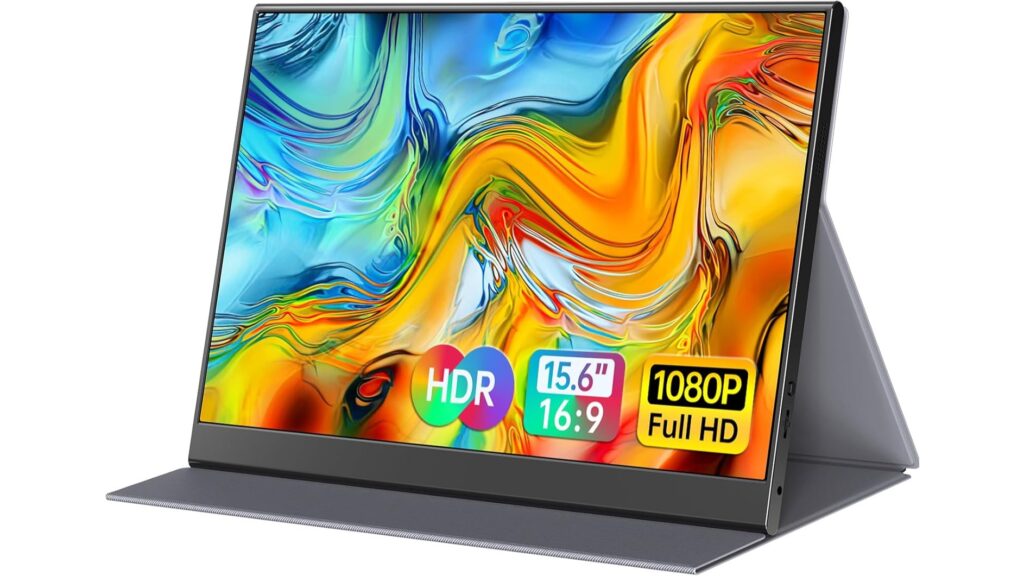
Key Specs: 15.6-inch FHD IPS display, dual USB-C ports, mini HDMI, magnetic smart cover, built-in speakers
Think portable monitors have annoyingly short cables that tangle? ForHelp is here to help. It boasts extra-long cables, making setup a breeze even in tight spaces. Its lightweight design and protective cover make it a perfect travel companion for on-the-go work needs.
Pros
This monitor is all about that easy, fuss-free setup. The long cables mean less frustration when trying to reach different devices or awkwardly stretching out that power cord. The picture quality is also surprisingly vibrant, making it great for both presentations and catching a movie on a business trip.
Cons
This monitor’s pinpoint color accuracy isn’t the greatest. Also, the built-in speakers are okay, but they aren’t going to win any awards for their immersive sound.
Best For DisplayPort Connectivity: Lenovo ThinkVision M14

Key Specs: 14-inch FHD IPS display, dual USB-C ports (with power passthrough), tilt-adjustable stand, super lightweight
If you live life on the go, the Lenovo ThinkVision M14 is certain to make your work life easier. It’s incredibly lightweight, delivers a clear picture, and offers power passthrough, meaning you can charge both the monitor and your laptop using a single cable.
Pros
Lenovo’s monitor is practically made for travel. It slips effortlessly into bags thanks to its slim design and super lightweight. The flexible stand and dual USB-C ports add to the convenience, letting you set up a comfortable workstation anywhere.
Cons
The image quality is solid with this monitor, but it doesn’t necessarily have the most dazzling colors or highest brightness levels. Also, creatives who need laser-accurate colors might want to consider a higher-end model.
The Bottom Line
Ultimately, the best portable monitor is the one that upgrades your workflow, expands your screen space, and enhances your gaming experience. With models catering to everyone from creative professionals to on-the-go gamers, there truly is an ideal second screen out there for you.
Sources: