

We may be living in a digital world, but when it comes to school, printers are still must-have tools. Whether you’re printing out that first grade school report or that mammoth college thesis, owning your own printer sure beats making multiple trips to the local print shop or school library to get work done.
As tech has evolved, printers have followed suit, with updated features like wireless and Bluetooth connectivity as well as multiple functions such as scanning or printing photos. With hundreds of printers on the market, choosing the right model might be a chore, but that’s where we come in. The list below features our picks for the best printers for school, addressing specific needs and budgets.
The Best Printers for Back to School
- Best Overall: Brother MFC-J4335DW INKvestment Tank All-in-One Printer
- Best Splurge: HP Color LaserJet Pro M283fdw Wireless All-in-One Laser
- Best Budget: HP DeskJet 2855E Wireless All-in-One Color Inkjet Printer
- Best Supertank: Epson EcoTank ET-2800 Wireless Color All-in-One Supertank
- Best Laser: Brother Monochrome Laser HLl2390DW
- Best Photo: Canon Pixma TR8620a All-in-One Printer
- Best Portable: Canon PIXMA TR150 Wireless Portable Printer
Best Overall: Brother MFC-J4335DW INKvestment Tank All-in-One Printer

Key Specs
- Type: All-in-One Printer
- Connection: USB, Wireless
- Ink: 4 cartridges (3 color, 1 black)
Pros
- Robust printing speeds of 20 black-and-white pages per minute (19 color pages per minute)
- Solid output on regular printer paper as well as photo paper
- High-quality scanner that can handle up to 2400 x 1200 dpi optical resolution
Cons
- Menu display screen is small and can be hard to read
Why We Chose It
When it comes to quality at a solid price point, Brother’s MFC-J4335DW is at the top of our list. It handles detailed printing jobs on photo paper as well as standard paper, and it’s fast enough to whip out those 100-page PhD dissertations in minutes. Its Wi-Fi connectivity makes it easy to use even if you’re on the other side of your house or dorm room. All print, copy, and scanning functions can also be handled from your mobile device via the Brother Mobile Connect app.
We appreciated the high-resolution capabilities of MFC-J4335DW’s flatbed scanner, and with a fax memory of up to 180 pages, the printer is well-equipped to transmit large documents. In short, this printer does everything and does it well.
Best Splurge: HP Color LaserJet Pro M283fdw Wireless All-in-One Laser

Key Specs
- Type: All-in-One Printer
- Connection: USB, Wireless, Network Ready
- Ink: 4 cartridges (3 color, 1 black)
Pros
- Fast printing speeds of 22 pages per minute
- Remote printing capability with mobile app
- Automatic two-sided printing
Cons
- Ink cartridges can run out fast
- Setup and software can be tricky
Why We Chose It
As they say, you get what you pay for, and some extra money gets you a whole lot with the LaserJet Pro M283fdw. In addition to all the multi-functionality you would expect from an all-in-one model, we like this printer’s voice-activated printing capability and built-in security features that protect it from malware attacks. The M283fdw also gets good grades from users for its high-quality laser output and quiet operation.
The M283fdw is an excellent printer for small offices but it’s just as useful for students with its reliability and accessibility over Wi-Fi and Ethernet networks. For those who are okay with spending a bit more, it’s a solid choice.
Best Budget: HP DeskJet 2855E Wireless All-in-One Color Inkjet Printer
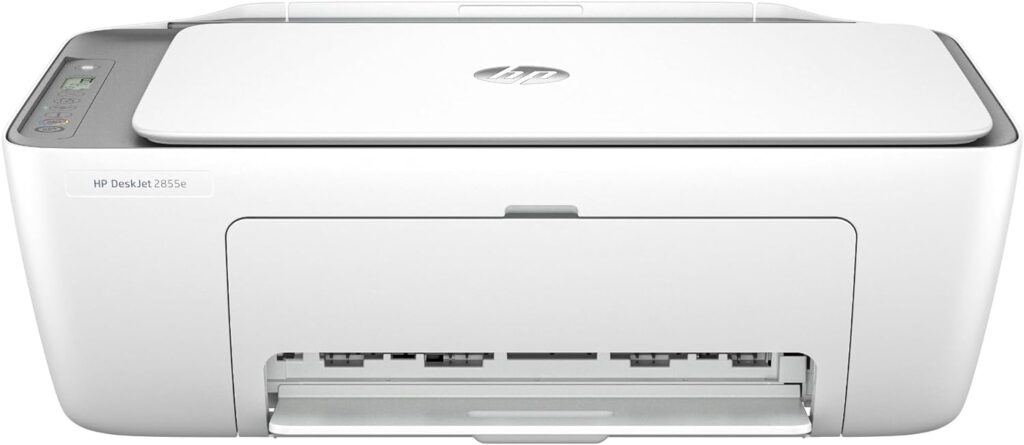
Key Specs
- Type: All-in-One Printer
- Connection: Wireless
- Ink: 2 cartridges (1 tri-color, 1 black)
Pros
- Strong Wi-Fi connectivity
- Good print quality for the price
- Easy setup
Cons
- Print speeds are slower than other printers on this list
Why We Chose It
If you need a back-to-school printer that doesn’t break the bank, we recommend the HP DeskJet 2855E. It handles all the major functions you would want, including printing, copying, scanning and faxing, and its 60-sheet input tray is more than fine for most student printing needs.
We appreciated the printer’s compact form, which makes it easy to fit on small or crowded desks, while its Wi-Fi connectivity ensures convenience and accessibility, especially if you’re sharing the printer with roommates. The print quality for both regular paper printouts and photo prints is also surprisingly good for the price. The Deskjet 2855E might not have some of the bells and whistles of the other printers in this list, but this is one printer that doesn’t sacrifice performance for value.
Best Supertank: Epson EcoTank ET-2800 Wireless Color All-in-One Supertank
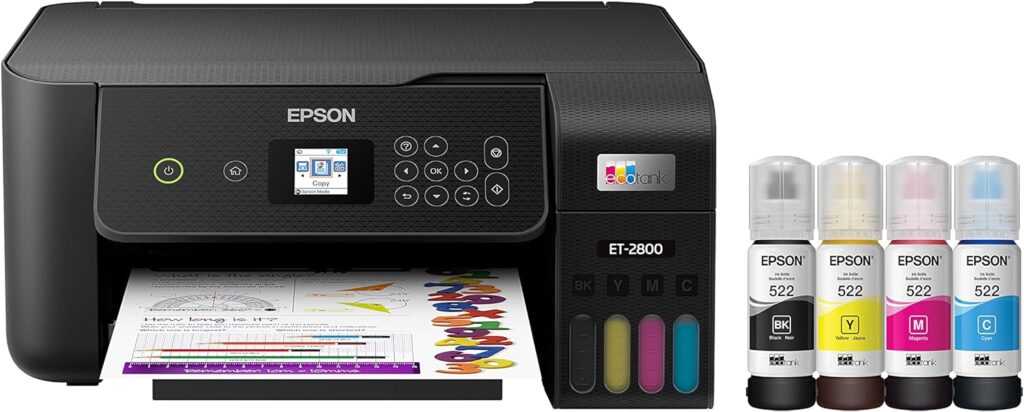
Key Specs
- Type: All-in-One Printer
- Connection: Wi-Fi, USB
- Ink: 4 ink containers (3 color, 1 black)
Pros
- Cheaper to refill than other printers
- Mobile print capability via app
- Easy setup
Cons
- Mobile app connection to printer can be shaky
- Print speeds on the slow side
Why We Chose It
Speaking of value for money, owning a printer can become an expensive proposition if you have to continually replace ink cartridges. The Epson EcoTank ET-2800 solves that issue with its refillable ink tank technology, while also supplying all the important features students need from a printer, including crisp print quality, a flatbed scanner and the ability to print photos.
The EcoTank ET-2800 also includes templates for creating letters, to-do lists and other useful documents, as well as voice-activated printing and a two-year supply of ink, but make no mistake, its major value proposition is the cheap cost of ink refills — and for students (and parents of students) who want to save a bit of cash, it’s a great choice if you want an all-in-one printer that can handle everyday printing jobs, without the hassle of swapping out cartridges.
Best Laser: Brother Monochrome Laser HLl2390DW
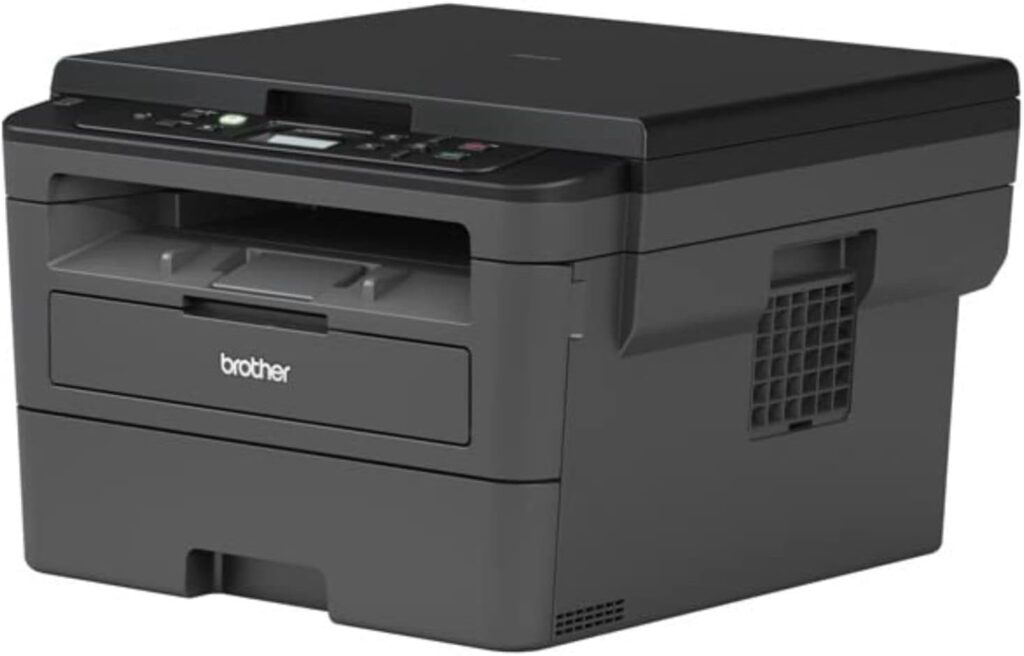
Key specs
- Type: All-in-One Printer
- Connection: Wi-Fi, USB, Ethernet
- Ink: 1 toner cartridge
Pros
- Fast print speeds of 32 pages per minute
- Crisp text
- Compatible with mobile devices
Cons
- No document feeder for scanner/copier
- Occasional mobile connectivity issues
Why We Chose It
Laser printers are ideal for printing documents that are heavy on text, and our laser printer pick, the Brother Monochrome Laser HLl2390DW, is all about crisp resolution and fast print times. As its name implies, the HLl2390DW outputs in black-and-white, at a whopping speed of 32 pages per minute, and its manual feed slot allows you to print cards, envelopes and paper of multiple sizes. The printer’s wireless technology also makes it easy to send print jobs from your phone, laptop or tablet.
The HLl2390DW’s flatbed scanner makes it easy to scan and copy documents, and as replacing laser printer toner tends to be cheaper than replacing inkjet cartridges, this printer will be easier on your wallet. If you plan on writing papers and documents that don’t need fancy colors, or can use a printer that outputs documents in a hurry, the HLl2390DW offers great print quality at a decent price.
Best Photo: Canon Pixma TR8620a All-in-One Printer

Key Specs
- Type: All-in-One Printer
- Connection: USB, Wireless
- Ink: 4 ink containers (3 color, 1 black)
Pros
- Handy front and rear-paper feed trays
- Produces rich colors on photo printouts
- Compact size
Cons
- Paper feed trays are fragile
- Print speeds aren’t the fastest
Why We Chose It
Need a printer that can handle top-notch photo prints as well as standard printing? The Canon Pixma TR8620a is our pick in this category. This inkjet printer gets high grades from users on print quality, and its front and back-loading trays make it easy to switch between paper printing and photo printing. Its auto-duplex feature also lets you print on both sides of the paper without a fuss.
The printer’s wireless functions make it easy to control from your mobile device, whether it’s printing, scanning or copying documents, and it prints at a solid pace of 15 pages per minute. We recommend this printer to any student who wants to print vibrant photos, whether it’s for school or personal use.
Best Portable: Canon PIXMA TR150 Wireless Portable Printer

Key Specs
- Type: Inkjet Printer
- Connection: USB, Wireless
- Ink: 2 ink cartridges (1 color, 1 black)
Pros
- Easy to carry and set up
- Prints on paper and photo paper
- Relatively fast print speeds
Cons
- Ink cartridges don’t last long, especially when printing photos
Why We Chose It
If you need to print stuff on the go, the PIXMA TR150 is a true lightweight, coming in at 4.5 pounds. It’s a convenient 8.5 x 14 inch-sized printer that’s easy to pack comfortably inside a backpack or bag. For true portability, the optional battery pack can operate the printer without an external power source, printing over 300 pages on a single charge. We liked the fact that the printer can churn out documents and photos up to letter size (8.5 x 11 inches) without a hitch, as well as its dual-sided and 4 x 6 borderless color photo printing abilities.
As you’d expect with a portable printer, you can print using a mobile app, and the printer has an anti-theft lock for extra security in or outside the classroom. Proof that good things can come in small packages, the TR150 is our pick for an effective printer that won’t weigh you down while you’re on the move.
How to Choose a Printer
How often do you plan to use your printer?
Do you anticipate printing out a few documents a week, or end-of-semester term papers? Will you use your printer for more than just schoolwork? Take these questions into consideration as you’re shopping for your printer. The general rule of thumb is to use inkjet printers at least once a week, so the ink nozzles don’t dry out. On the other hand, laserjet printers can go for long periods without printing and still operate just fine.
Are you printing mainly text documents or do you plan to print a lot of images?
While the inkjet and laser printers on our list can handle text documents just fine, inkjets usually produce more vibrant photos, as laser printers are calibrated to print on regular printer paper. If you’re focused on only printing text documents, you should consider a laser printer, as they print at higher speeds.
How much will the total cost of ownership be (taking into account purchasing ink)?
During the life of your printer, ink will be the major expense. Depending on the make and model, ink and toner replacement cartridges can range from around $30 to over $100. When selecting a printer, read up on what cartridges you’ll need to stock up on, and how long a cartridge typically lasts.
Bottom Line
For most printing needs, you can’t go wrong with any of the printers on this list, as we’ve found them to be dependable and fully capable of handling students’ everyday needs. However, our top overall choice is the Brother MFC-J4335DW, as it not only boasts quality output at fast speeds but also handles other functions such as scanning and copying with best-in-class resolution.
Frequently Asked Questions
Is it worth it to buy a printer as a student?
Your printer needs will depend on the classes you take, and how your school handles homework. Some schools will have a cloud computing setup (i.e., Google Docs), which means you can create and hand in homework without needing a hard copy. Some schools and campuses provide a limited amount of printing free of charge or have a “print room” where students can print their work. In the end, it’s worth getting a printer if you need to print your own documents now or in the near future, and don’t want to deal with the hassle of using equipment that’s not your own. Having your own printer can be even more economical if you’re sharing it with roommates or fellow students, so everyone can pitch in for upkeep and ink refills.
What is an all-in-one printer?
An all-in-one printer not only handles print jobs but also can scan or copy documents. Some all-in-one printers also give you the ability to scan documents and send them out as faxes. If you have need of these functions, an all-in-one printer is a logical choice and saves you from having to buy separate printers, scanners and copiers.
Which is better, laser or inkjet printers?
If speed and bulk printing jobs are your game, laser printers are the better bet, as they print at high speed and can handle documents that are hundreds of pages long within minutes. Inkjet printers are superior when it comes to printing colorful, saturated images and photos, so if graphic imagery plays a large role in your schoolwork, inkjets are the best choice. If you’re looking to save money, inkjet printers also tend to be cheaper (although the costs of ink can add up compared to a laserjet printer).
Methodology
First and foremost, our printer research focused on overall print quality; the printers we’ve chosen can produce crisp text documents and dynamic photos. We also favored models that could handle important tasks such as scanning and copying at a high level. “Bang for the buck” was key in our evaluations, as it was important to find printers that could fit student budgets without sacrificing quality or speed. Wireless connectivity was also a prime consideration, as it’s advantageous to access a printer from across a room or house, or for dorm mates or fellow students to share the printer. We also took size into account: Several of our picks are compact enough to fit in tight spaces or on a small or crowded desk.