Maybe you don’t actually need “more bar prep”; maybe you just need better leverage. That’s right: not another 12-hour study day, and not a $3,000 course you’d half-watch at 1.5x speed while you scroll through Instagram. Maybe all you really need is something that could tighten your grasp of the fundamentals fast, clean up weak topics, and keep moving.
That’s where Quimbee SideBar Videos excel.
In this Quimbee SideBar Videos review, I’m going to be plain about what they do well, what they don’t do at all, and who actually benefits. If you’re a bar prepper who’s fairly self-directed and you want a low-cost leg up (not a full-on program with a calendar telling you when to blink), these videos can be a smart, efficient add-on.
Key Takeaways
- A Supplement, Not a System: Quimbee SideBar Videos work best as a targeted add‑on, not a replacement for a full bar prep course.
- High‑Yield Over Long Lectures: Short, visual lessons focus on the rules and traps that actually show up on the bar, without lecture bloat.
- Best for Self‑Directed Test Takers: SideBar shines if you already have discipline, a study plan, and are committed to real practice.
- Clarity Comes Before Practice: The videos are most effective when used to clean up rule confusion right before MBE questions or essays.
- Strong Value on a Budget: If SideBar helps turn a few weak subjects into average ones, it delivers a solid score lift per dollar spent.
What Quimbee SideBar Videos Are (And What They Aren’t)

SideBar Videos are Quimbee’s bite-sized lecture library designed to teach black-letter law in an efficient, visual way. Think: high-yield explanations you can watch quickly, then immediately apply to practice questions.
They’re also easy to misunderstand. SideBar isn’t a complete bar review course, but it’s not trying to be.
SideBar vs. Full Bar Review Courses
A full bar course typically includes (1) a day-by-day schedule, (2) a massive question bank, (3) graded essays or PT feedback, (4) progress tracking, and (5) a built-in “do this next” structure that (for better or worse) makes decisions for you.
SideBar Videos are more like a clean, modern lecture supplement:
- Instruction-first: short lessons that explain rules and common traps
- Flexible: you choose what to watch and when
- Lightweight: minimal hand-holding compared to Barbri, Themis, or Kaplan-style programs
If your biggest problem is knowing what to do each day, SideBar won’t magically solve that. But if your biggest problem is getting rules into your head in a usable way, it’s a strong tool.
When A Video-First Supplement Makes Sense
Video-first study makes the most sense when you:
- Learn faster by hearing/seeing a concept before drilling it
- Need a refresh more than a full re-teach (especially if you were solid in law school)
- Are rebuilding confidence in a subject you haven’t touched since 1L
And honestly? If you’re already a strong test taker, videos can help you stabilize the “middle” of your score—those questions you miss because you half-remember the rule, not because you’re totally in the dark.
What You Get: Subjects, Format, And How The Library Is Organized
Bite-Sized Lessons, Visuals, And Built-In Review Tools
Let’s talk about what’s actually inside:
- 270+ bite-sized video lessons
- Each video lasts around 5-7 minutes (for a total of ~30 video hours)
- 3 MCQs per video to gauge understanding (800+ total)
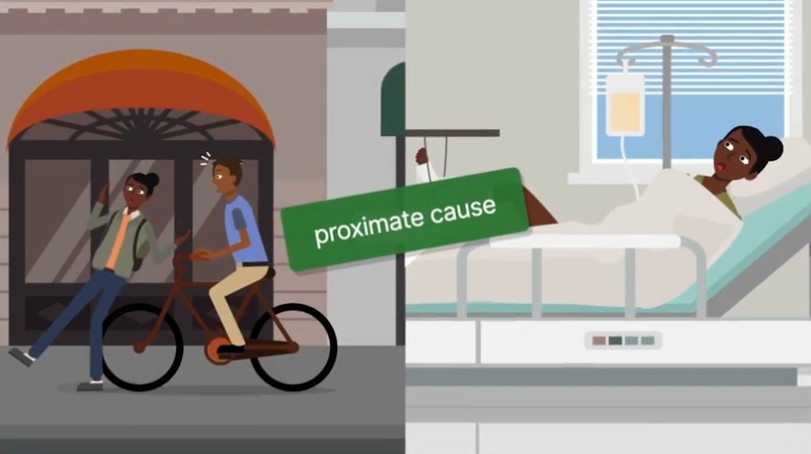
Most SideBar lessons I watched were short—usually in the 5–7 minute range—and each one was built around a single, narrow concept rather than a whole subject at once. I wasn’t watching a talking head wander through doctrine. The format is visual and structured, with illustrations doing much of the explanatory work, so I could see how a rule operates instead of just hearing it described.
The teaching style is intentionally high-yield. In my experience, the videos consistently focus on:
- The rule you’re most likely to be tested on
- The standard exceptions that actually move points
- The patterns and traps that show up repeatedly in multiple-choice questions
They don’t spend much time on edge cases unless those edge cases are realistically testable. That’s a tradeoff, but for me—especially when studying in shorter blocks—it felt like the right one.
Pacing-wise, the videos move quickly but not carelessly. When I already had some background in a subject, the speed felt efficient rather than rushed. When a topic was newer or weaker for me, I sometimes paused or rewatched a short segment, but I was never stuck sitting through filler just to get to the useful part.
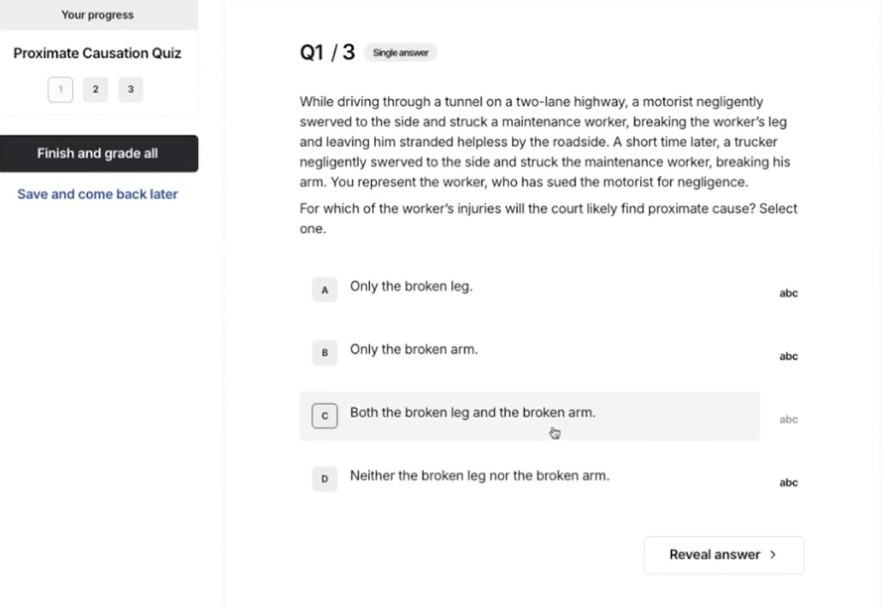
Each video ends with a short, optional multiple-choice quiz, usually three questions tied directly to what I just watched. I didn’t treat these as real practice sets. Instead, I used them as a quick check: did that explanation actually land, or am I about to carry a misunderstanding into my next block of questions?
One thing I appreciated is how easy the library is to use selectively. I didn’t feel any pressure to “work through” SideBar in order. When a specific issue kept tripping me up—say, a particular hearsay exception or a contracts formation wrinkle—I could search for that exact topic, watch a short explanation, and get back to practice without derailing my study plan.
The limitation I noticed is the same one I’ve mentioned elsewhere: watching videos alone doesn’t build timing, endurance, or writing skill. SideBar worked best for me as a precision tool. I used it to tighten rules, clear up confusion, and then immediately force output with questions or essays. Used that way, the format does what it’s designed to do without pretending to be more than it is.
Search, Playback Speed, Notes, and Offline-Friendly Use
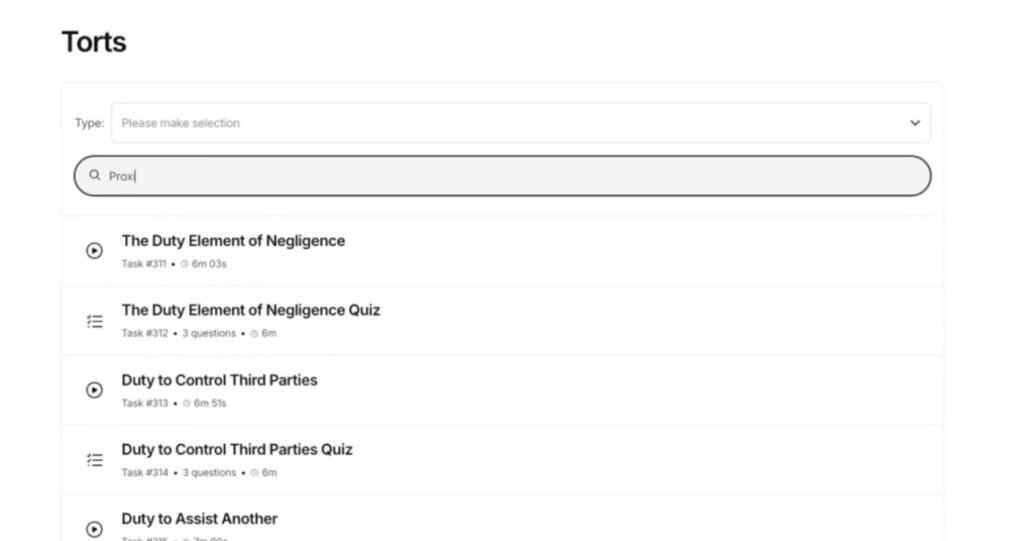
This is where I think SideBar earns its keep as a supplement: you can actually use it like a reference library. When I’m stuck on a narrow issue, I don’t want to hunt through a two-hour lecture. I want to search, play, confirm, and move on.
In a modern bar prep plan, I’d expect to use features like:
- Search to pull up one subtopic fast
- Playback speed to match your comfort level (faster for review, slower for brand-new concepts)
- Notes or quick timestamps so you can return to the exact confusing segment
Mobile study is the hidden value here. Not because you can “study anywhere” (everyone says that), but because mobile-friendly video turns dead time into targeted rule reinforcement.
How To Use SideBar Videos In A Real Study Plan
If you buy SideBar and just “watch videos,” you’ll feel productive… right up until a mixed MBE set trips you up a week before your exam date.
So here’s how I’d use SideBar Videos so they translate into score movement.
Best Pairings: Outlines, Practice Questions, And Active Recall
My favorite pairing is:
- SideBar video (concept clarity)
- Short outline/attack sheet (rule language)
- Practice questions (pattern recognition)
- Active recall (memory + retrieval speed)
What would using these together look like in real life? Let’s take a look.
Sample Weekly Workflow For Strong Test Takers On A Budget
This is the kind of week I’d run if I were a strong test taker who wants a low-cost boost rather than a full course:
Monday–Thursday (60–90 min/day):
- 1–2 SideBar lessons
- 20–30 MBE questions (timed, then reviewed)
- 10 minutes active recall (rules from memory)
Friday (60–90 min):
- Mixed MBE set (40–50 questions)
- Review + error log
Saturday (2–3 hours):
- 1 timed essay
- Self-grade using a model answer
- SideBar refresh on the weakest sub-issues
Sunday (light/reset):
- Rewatch only your “top 3 leaky topics”
- Quick recall drills
If you’re already good at test strategy, the real goal is to reduce unforced errors, rule fuzziness, exception confusion, and timing hiccups.
Pros, Cons, And Who This Is Best For
I’ll be direct: SideBar Videos are good at what they’re designed to do. The problem is that some bar preppers want a supplement to behave like a full program.
Best Fit: DIY Bar Preppers Who Need A Solid Base And Efficient Refreshers
SideBar is a strong fit if you:
- Are self-directed and don’t need a strict calendar
- Want fast rule clarity and efficient review
- Learn well from visuals and tight explanations
- Already plan to do real practice (MBE sets + essays)
In other words, it’s ideal for the “give me a leg up” crowd, people who are capable of passing but want more confidence, cleaner fundamentals, and fewer gaps.
Not Ideal For: Students Who Need Heavy Structure Or Extensive Feedback
I wouldn’t recommend SideBar as your main solution if you:
- Freeze without a structured, day-by-day plan
- Need graded essays or personalized feedback to improve writing
- Struggle with motivation or consistency without external accountability
- Aren’t an audiovisual learner
Also, if you’re starting from a very low baseline (long gap since graduation, shaky foundation, heavy test anxiety), you may need a more structured course—or at least a more comprehensive package than videos alone. For full course options, check out my recommendations (with coupons!) right here.

Pricing, Access, And Value Compared To Other Supplements
Value in bar prep is simple math: How much score lift do you realistically get per dollar and per hour?
SideBar typically competes with other “supplement” categories:
- Flashcards (physical or app-based)
- Outline bundles
- Question bank add-ons
- Tutoring blocks
- Other video libraries
SideBar Vs. Other Video Or Flashcard-Style Supplements
Compared to flashcards, SideBar gives you more explanation and context. Flashcards are great once you already understand the rule. Videos are better when you’re still building the mental framework.
Compared to other video supplements, SideBar’s edge is the short, high-yield format. You’re less likely to waste time on rambling lectures. That matters when you’re studying nights and weekends.
That said, if you want day-to-day structure plus writing feedback, a traditional course often wins, assuming you’ll actually use it.
How To Decide If The Cost Delivers Enough Score Lift
Here’s the decision rule I use:
- If videos will help you turn 2–3 weak subjects into average subjects, SideBar is usually worth it.
- If videos will only make you feel productive while avoiding timed practice, it’s not.
A quick self-check before you buy (or right after you buy):
- List your weakest 3 subjects.
- Commit to a measurable weekly output (e.g., 150 MBE questions + 1 essay).
- Use SideBar only as the “clarity tool” that supports your output goal.
If you do that, SideBar can be a very cost-efficient boost, especially for strong test takers who don’t need a full curriculum—just a clean push forward.
Conclusion
My take after using and evaluating the format: Quimbee SideBar Videos are a smart, low-cost bar prep boost when you treat them like what they are, a tight, video-first rule refresher that supports practice.
If you’re self-directed, reasonably disciplined, and already planning to grind real MBE sets and timed essays, SideBar can help you sharpen doctrine quickly and reduce the kind of rule fuzziness that quietly drags scores down.
Frequently Asked Questions
Quimbee SideBar Videos are a bite-sized, video-first lecture library focused on high-yield black-letter law with clear visuals and plain-English teaching. They’re meant to tighten rules fast and support practice. They are not a complete bar review course with schedules, essay grading, or built-in accountability.
This Quimbee SideBar Videos review points to a best fit: self-directed bar preppers who want quick rule clarity, efficient refreshers, and less “lecture bloat.” They work especially well for strong test takers shoring up weak or rusty subjects—so long as you’re also doing real MBE sets and timed essays.
Quimbee SideBar Videos are strongest for MBE-style doctrinal mastery—rules, exceptions, and common traps. They can also support essays by improving rule statements and issue-spotting, but you still need writing practice. For performance tests (MPT/PT), they’re not the primary tool; timed reps and structure review matter more.
Use SideBar as “input,” then force “output.” Watch a 10–20 minute lesson, write a 3–5 line rule from memory, do 10–15 targeted questions, and review every miss (rule gap vs. misread vs. distractor). Rewatch only the segment that fixes the specific weakness to avoid passive studying.
Usually, no. Full bar courses provide a day-by-day schedule, large question banks, progress tracking, and graded essay/PT feedback—structure SideBar doesn’t try to offer. If you freeze without a plan, need accountability, or require writing feedback, a traditional course is safer. SideBar is best as a supplement, not a replacement.
They’re typically worth it when they convert 2–3 weak subjects into “average” by improving rule clarity quickly, especially with mobile-friendly search and short lessons. They’re not worth it if you use videos to feel productive while avoiding timed practice. Pair them with outlines and consistent question/essay output for a real score lift.