The LSAT is a huge part of getting into your dream law school, and it’s not a choice a smart student would make lightly.
Weighing two of the newer options? Read our LSAT Demon review, or see how 7Sage and LSAT Demon compare directly.
If your shortlist came down to those two instead, we tested Blueprint against LSAT Demon head to head.
And that’s exactly why you’re here.
In this list, I’ll outline the best LSAT prep courses I’ve identified based on dozens of hours of testing as a professional prep course reviewer. Together, we’ll compare, contrast, and help you get to the bottom of the question:
If your shortlist is already down to two, the Blueprint and Kaplan matchup goes deeper than a roundup like this one can.
Which LSAT review course is the best fit for me?
Which LSAT Course is Right for You?
We’ve put together a short list of questions that will help us determine which LSAT course is the best pick for you!
Best LSAT Prep Courses at a Glance
- Blueprint: Best overall
- Kaplan: Best for live classes
- Magoosh: Best for budget-friendly prep
- Princeton Review: Best for traditional classes
- 7Sage: Best for targeted drills
- LSATMax: Best for AI tutoring
Best LSAT Prep Course Comparison
| Feature |  |  |  |
|---|---|---|---|
| Practice Questions | 7,000+ | 8,000+ | 6,000+ |
| Full-Length Exams | 57 | 55+ |  |
| Money-Back Guarantee | (170+ Course) |  | (+5 Score) |
| Support | Live Review, Discord | Live & On-Demand Help | |
| Pricing | $99/month–$2,699 | $899–$2,299+ | $199–$499* |
| Get Started | Start Now | Start Now | Start Now |
1. Blueprint LSAT: Best Overall

Blueprint was the easiest platform for me to get into without overthinking it. I opened the study plan, moved one of the days around, and the calendar reshuffled the rest of the week for me. I did not have to go back through and fix every task myself, which was honestly nice.
Related Guide
Need a closer look at LSAT courses? See the blueprint review before you buy.
The analytics were also worth checking after a practice set. I could see which question types kept slowing me down, even when I was still getting some of them right. The animated lessons made the harder topics easier to sit through, but the course is very digital. Almost everything happens inside the platform.

Study Materials I Had Inside Blueprint
- Adaptive Study Plan: I moved one study day, and the rest of the calendar adjusted around it.
- Performance Analytics: I could spot the question types that were eating up the most time.
- Interactive Learning Modules: The animations helped break down conditional reasoning without dragging it out.
- Qbank: More than 7,000 real LSAT questions gave me plenty to click through.
- Practice Exams: Full-length tests are built in, so the platform covers more than short drills.
Blueprint Packages
- Starter: Self-paced lessons, study plan, Qbank, and official LawHub exams
- Pro: Adds unlimited live review sessions six times per week and a score-increase guarantee
- Live Course: Adds 30 hours of live instruction and full self-paced access
- 170+ Course: Includes 60 hours of live instruction, coaching, and a 170+ guarantee
- LSAT Tutoring: One-on-one prep with a personalized study plan
Pros
✅ I could move a study day without wrecking the rest of the calendar.
✅ The analytics made it easy to catch where I was losing time.
✅ The animated modules broke up the harder concepts.
✅ Lessons, practice sets, and full exams all live in one place.
Cons
❌ I wanted more printed material to work with offline.
❌ Doing almost everything on a screen got old after a while.
❌ The plan options took me a minute to sort through.
My Take on Blueprint
Blueprint is easy to recommend for a full LSAT setup without a confusing dashboard. It is very screen-heavy, but the platform does a good job of keeping the study plan manageable once real life starts messing with the calendar.
Blueprint LSAT
2. Kaplan LSAT: Best for Live Instruction

The chat was honestly the part that sold Kaplan’s Live Online class for me. The instructor was working through a logical reasoning question, and people kept dropping smaller questions off to the side. Someone from the support team answered them while the lesson kept moving, so the whole class did not get derailed every two minutes.
Related Guide
If you are still choosing a provider, start with our kaplan review roundup.
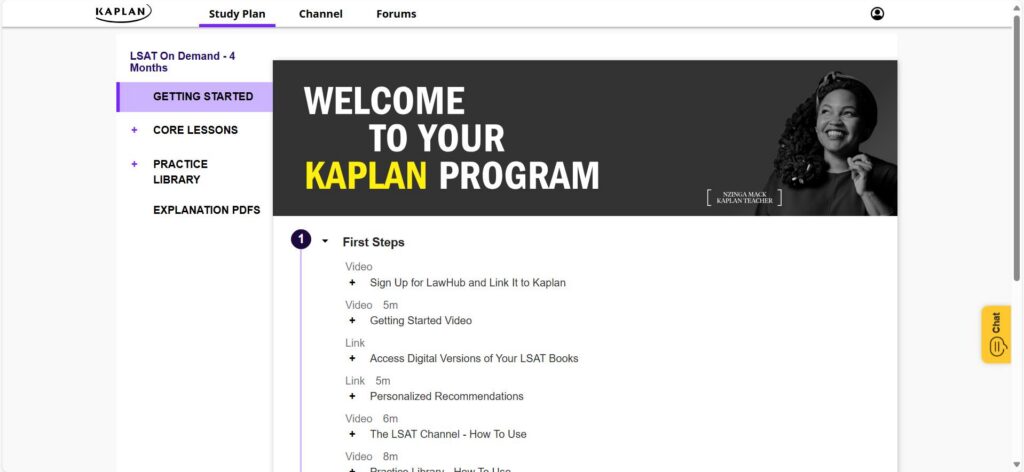
Kaplan has a lot going on once you start clicking around. The LSAT Channel, practice sets, and Personalized Study Calendar took me a minute to sort out. The dashboard is not especially cute or modern, but the actual class setup works. It feels like a real place to show up, ask questions, and get through the material without having to piece everything together alone.
What I Used Inside Kaplan
- Live Online Classes: I liked that the chat could handle smaller questions while the instructor kept the lesson moving.
- LSAT Channel: Includes 60 hours of live and on-demand lessons covering each section and question type.
- Personalized Study Calendar: Keeps the study plan laid out without making me figure out the next step alone.
- Official LSAC Questions: Includes nearly 6,000 released questions with detailed explanations.
- Interactive Hints: Adds instant feedback while working through questions.
- Instructor Access: Even the On-Demand plan includes a team of LSAT instructors for extra help.
Kaplan Packages
- Live Online: Scheduled classes with on-demand access
- On-Demand: Self-paced lessons and practice tools
- In-Person: Classroom instruction in select locations
- LSAT Tutoring: One-on-one help with a custom plan
Pros
✅ Live classes help keep you accountable.
✅ You like asking questions while the lesson is still happening.
✅ A large practice library keeps you from running out of drills.
✅ You want online, in-person, and self-paced options.
Cons
❌ The dashboard took me a little time to sort through.
❌ Large classes can make personal feedback less consistent.
❌ Some parts of the platform look more traditional than polished.
My Take on Kaplan
Kaplan makes sense when showing up to a real class helps you stay on track. I liked having the instructor explain the main question while the chat handled the smaller stuff in the background. The platform takes a little time to learn, but the live setup is the reason to pick it.
Kaplan LSAT
3. Magoosh LSAT: Best Budget-Friendly LSAT Prep

Magoosh took me like two minutes to figure out. I opened one of the video explanations after a practice question, saved a note beside it, and bookmarked the part I wanted to come back to. Nothing was buried under a bunch of random tabs.
Related Guide
Need a closer look at LSAT courses? See the magoosh review before you buy.
The explanations were the best part for me. They got into why an answer was wrong without making every question feel like a full lesson. I also clicked through the study schedules and liked having a checklist already made for different timelines. It is one of the more budget-friendly ways to get a full prep setup, especially if live classes are not a priority. The platform is pretty basic, and email is the main way to reach a tutor. Still, it is easy to keep up with.

What I Clicked Through in Magoosh
- 80+ Video Strategy Lessons: Short explanations covering concepts, common mistakes, and shortcuts.
- 1,000+ Question Explanations: I liked having more than 700 expert video walkthroughs to open after a missed question.
- 6,000+ Official LSAT Questions: Real questions through the LSAC integration.
- Timed Practice Tests: Uses the official LSAT test-day interface.
- Study Schedules: Checklists for timelines ranging from one to six months.
- Notes and Bookmarks: I could save anything I wanted to come back to without losing my place.
- Mobile Apps: Works on desktop, iOS, and Android.
Magoosh Packages
- Premium: Self-paced lessons, official questions, practice tests, study schedules, email help, and a +5 score guarantee
- Guided Study: Adds 12 hours of on-demand classes, custom homework, and targeted assignments
Pros
✅ You want something simple enough to start using right away.
✅ Short video explanations help more than long lectures.
✅ You like saving notes and bookmarks while reviewing questions.
✅ You want a full year of access without a strict class schedule.
Cons
❌ Tutor help happens through email, so answers are not instant.
❌ There is no live-class setup.
❌ The dashboard looks pretty basic next to the more polished platforms.
Where Magoosh Fits
Magoosh is a solid option when I want to log in, watch a clear explanation, and keep moving. It is pretty bare-bones, and the support is mostly through email. The simple setup is also what makes it easy to use without overthinking everything.
Magoosh LSAT
4. Princeton Review LSAT Prep: Best for Traditional LSAT Classes

Princeton Review is a lot more class-heavy than the other options. The 170+ Course has 65 hours of live instruction, and the 170+ Immersion plan jumps all the way to 130 hours plus another 56 hours of workshops. That is great for anyone who wants a full schedule already mapped out, but it is definitely not a light, little study plan.
Related Guide
We ranked the field in our princeton review for a side-by-side look.
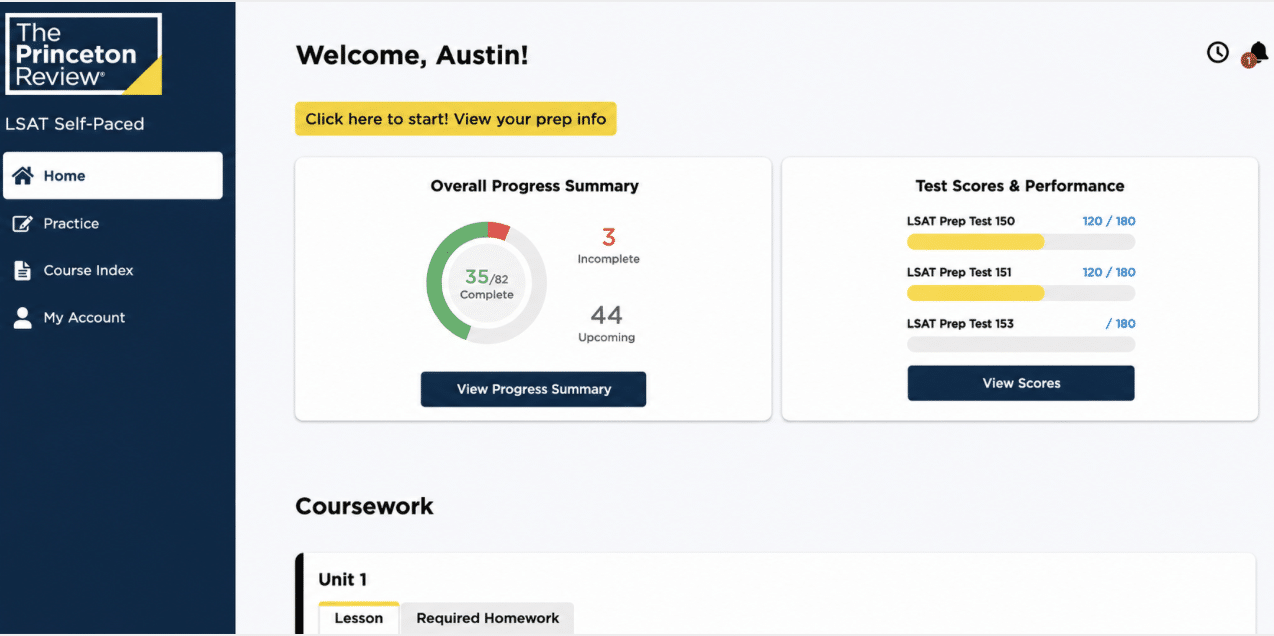
The part I liked most was The Princeton Review’s flexible attendance. Missing one class does not automatically throw the whole week off because I could join another live session covering the same lesson. The updated dashboard also keeps the lessons, drills, and tests together, which helps when the course already has this much material packed into it.
What Comes With Princeton Review
- Flexible Attendance: I liked being able to make up a missed 170+ class live instead of falling behind.
- 90+ Official LSAT PrepTests: Includes one year of LawHub Advantage access with real LSAT practice.
- New LSAT Dashboard: Keeps lessons, drills, tests, and progress tracking in one place.
- LSAT Course Manual eBook: Adds written material for anyone who likes studying from notes and manuals.
- Score Guarantees: Eligible plans include a higher-score guarantee, with a 170+ option for the larger live courses.
- Content Workshops: The Immersion plan adds guided practice, score analysis, and extra lessons.
Princeton Review Plans
- Self-Paced: Recorded lessons, study materials, official PrepTests, and dashboard tools
- Fundamentals: Adds 30 hours of live instruction
- 170+ Course: Adds 65 hours of live instruction, Flexible Attendance, and a 170+ guarantee
- 170+ Immersion: Adds 130 hours of live instruction and 56 hours of workshops
Pros
✅ I liked having a live make-up option when a class did not fit my schedule.
✅ The dashboard keeps a huge amount of material from getting too scattered.
✅ LawHub Advantage is already included with the plans.
✅ The live courses come with a clear schedule and a lot of instructor time.
Cons
❌ The bigger plans are a serious time commitment.
❌ The amount of material could get overwhelming fast.
❌ The self-paced plan leans heavily on videos, manuals, and drills.
Who Is Princeton Review Best For?
Princeton Review makes the most sense for someone who wants a real class schedule and a lot of material already laid out. Flexible Attendance makes the live setup easier to manage, but the larger plans are a pretty big commitment.
Princeton Review LSAT
5. 7Sage LSAT: Best for Targeted Drilling

7Sage is more practical than exciting. I did not have a huge wow moment when I opened it, but the practice setup started making sense once I clicked into the Smart Drills and Performance Analytics. I could see which question types needed more work and build another set around them without digging around for the right questions myself.
Related Guide
We ranked the field in our 7sage review for a side-by-side look.
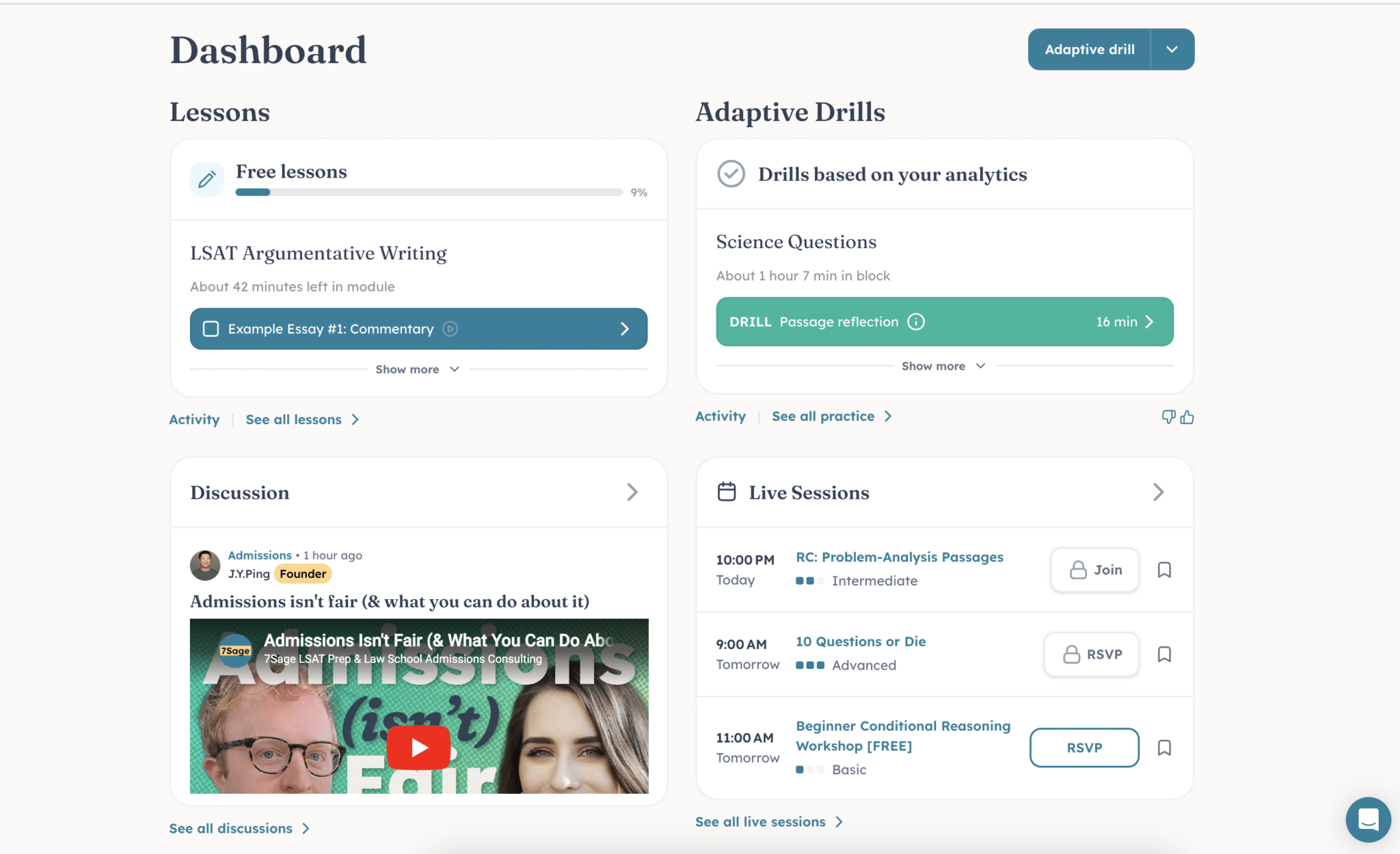
The interface looks pretty plain, and the plan page has a lot going on. I had to read through it a few times before the difference between Core, Live, and Coach fully clicked. Still, the self-paced tools cover a lot, especially if most of the studying is going to happen through practice questions.
The Tools That Make 7Sage Useful
- Smart Drills: I liked being able to build focused question sets around weaker areas instead of clicking through random practice.
- Performance Analytics: I could see where the same mistakes kept showing up across completed questions.
- Adaptive Study Scheduler: Maps out the study plan and adjusts as the timeline changes.
- AI Coach: Adds quick study suggestions and another place to ask questions.
- Every Official LSAT: Keeps the practice grounded in real exam questions.
- Every Question Explained: Helps make sense of the logic after a missed question.
- Comprehensive Video Course: Covers the full curriculum when drills alone are not enough.
7Sage Core Packages
- Core: AI Coach, adaptive scheduler, video course, Smart Drills, analytics, official LSATs, and question explanations
- Live: Adds daily live sessions, weekly proctored tests, office hours, class recordings, and Ask a Tutor
- Coach: Adds a dedicated coach, two monthly sessions, weekly accountability emails, and priority Ask a Tutor responses
Pros
✅ I could turn weaker question types into another drill pretty quickly.
✅ The analytics made repeat mistakes easier to catch.
✅ Core already includes the main tools I would actually use.
✅ Live adds daily sessions without making the self-paced plan feel stripped down.
Cons
❌ The interface looks pretty plain.
❌ I had to read through the plan page a few times before it made sense.
❌ The AI Coach limits change by plan, but the differences are not obvious at a glance.
Is 7Sage Worth Trying?
7Sage did not pull me in with the platform design, but the practice tools are solid. Smart Drills and Performance Analytics made it easy to see what still needed work and keep going without overthinking the next step.
7Sage LSAT
6. LSATMax: Best for On-Demand AI Tutoring

LSATMax is a little different from the other courses because the newer setup leans heavily on Solomon AI. I clicked through the missed-question breakdowns and could see the appeal. You can plug in a specific PrepTest question and get a clearer explanation of where the reasoning went off, which is useful when the normal answer key still leaves me confused.
The full-course side feels thin, though. LSATMax makes the most sense when the main problem is getting stuck on specific questions and needing better feedback right away.
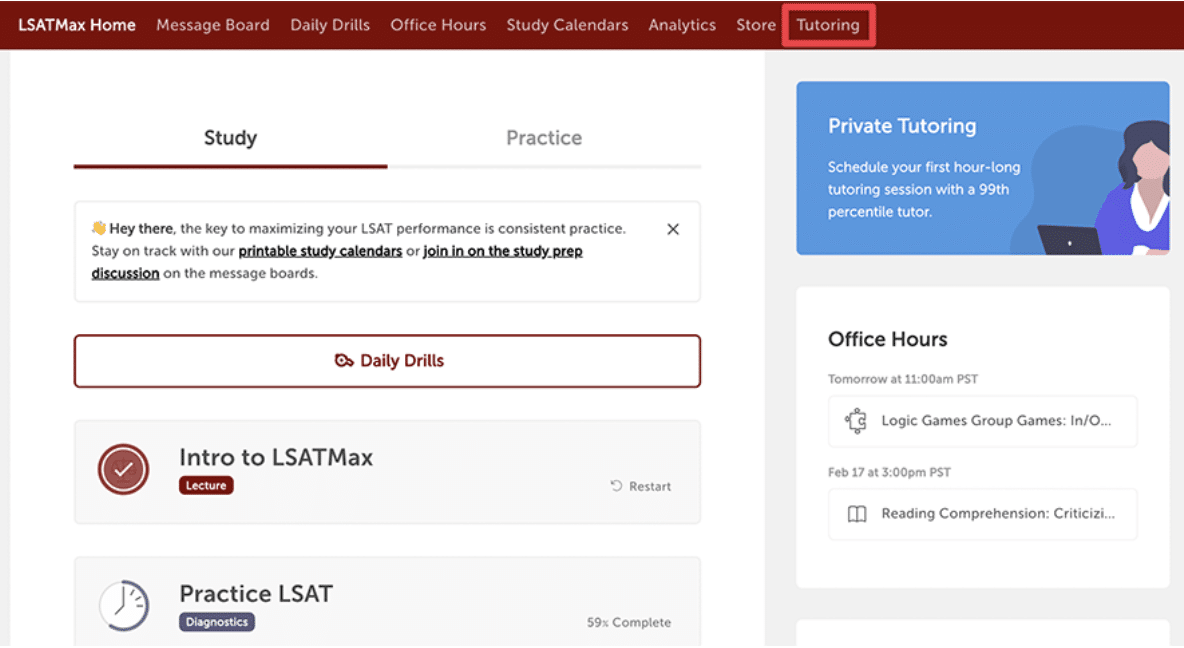
LSATMax Course Perks
- Missed-Question Post-Mortems: I liked being able to use a specific PrepTest and question number to see exactly where the logic broke down.
- Logical Reasoning Help: Covers assumptions, strengthen/weaken questions, flaw patterns, parallel reasoning, and other common LR question types.
- Study Plan Tweaks: Adjusts the plan around the timeline, baseline score, target score, and weaker areas.
- 24/7 Access: Opens mid-drill without waiting for office hours or scheduling a tutoring session.
- 90+ Official PrepTests: Keeps the practice tied to released LSAT material.
- Personalized Analytics: I could see how the platform is meant to catch patterns when progress starts stalling.
LSATMax Options
- Solomon Core: AI tutoring for steady weekly prep
- Solomon Plus+: The same AI tutor with higher usage limits for daily prep and retakes
- Private Tutoring: One-on-one sessions with 99th-percentile tutors and Solomon Core access
Pros
✅ Solomon gives more detail than a basic answer key.
✅ I liked the question-by-question breakdown angle.
✅ The 24/7 access makes sense for random late-night study sessions.
✅ Private tutoring is there when AI help is not enough.
Cons
❌ The current setup leans more toward tutoring support than a full course experience.
❌ Full Reading Comprehension support for Solomon is still in development.
❌ The product lineup took me a minute to untangle.
My Take on LSATMax
LSATMax is most interesting for Solomon AI. The missed-question breakdowns are a smart way to get unstuck during Logical Reasoning practice. It is lighter on the full-course experience, so it makes the most sense when the main issue is feedback, not finding more material.
LSATMax
Other LSAT Prep Courses to Check Out
- LSAT Lab: Worth a look for live classes, analytics, and a customizable study plan.
- AlphaScore: A simpler self-paced option for video lessons and practice questions.
- TestMasters: Better suited to anyone who wants a more traditional LSAT class setup.
- Mometrix: Best treated as a supplemental resource for extra review and practice.
5 Questions to Ask Before Choosing an LSAT Prep Course
- Do you want the most complete setup? Start with Blueprint. The study plan, analytics, lessons, and practice tools all live in one place.
- Will a live class keep you on track? Kaplan makes more sense if you need a set schedule and instructor support.
- Do you want something simple and self-paced? Magoosh is easy to open, use, and keep up with.
- Are practice questions your main focus? 7Sage’s Smart Drills make it easy to target weaker areas.
- Do you need more help after missed questions? LSATMax uses Solomon AI to break down where the reasoning went wrong.
My Final Take
The best LSAT prep course is the one you will actually keep using. Blueprint ended up being the easiest one for me to picture sticking with because the calendar, lessons, and practice tools all made sense together without creating extra work.
After that, the choice gets more specific. Kaplan is better for live classes, Magoosh keeps things simple, and the other options make more sense when you already know exactly what kind of help you need.
LSAT Course Comparisons
Read the full reviews and head-to-head tests that feed this roundup.
LSAT Exam Resources
Once you pick a course, these guides cover the exam itself: requirements, sections, scoring, dates, and how to study.
- LSAT Practice Questions and Quiz
- LSAT Score Calculator
- LSAT Requirements: A Comprehensive Guide
- Tips to Create an LSAT Study Schedule That Works
- LSAT Passing Score: What You Need to Know
- LSAT Pass Rate: What You Need to Know
- How to Improve LSAT Score
- LSAT Sections: Everything You Need to Know
- How Long to Study for the LSAT
- How is the LSAT Scored? What You Should Know
- LSAT Score Range: What You Need to Know
- How Much Does It Cost to Take the LSAT?
- How Many Questions Are on the LSAT?
- How to Study for the LSAT: Prep Tips You Need to Know
- How Many Times Can You Take the LSAT?
- How Hard is the LSAT? Know the Difficulty to Pass
- What is a Good LSAT Score?
- How Long is the LSAT? What You Need to Know
- What is the LSAT? What You Need to Know
FAQs
The right LSAT prep course for you varies depending on your learning style and needs. If you have a strong knowledge base and prefer self-study, LawHub™ is an excellent choice. However, for comprehensive preparation, Blueprint LSAT Prep, Kaplan and Magoosh are highly recommended courses.
Investing in LSAT prep courses can be highly beneficial, especially if it leads to scholarship opportunities. While self-study materials may be sufficient for some, comprehensive prep courses provide structured guidance and practice, making them worth the investment for many students.
Two months can be enough for LSAT prep, but it depends on your study habits and goals. Intense study sessions, practice exams, and thorough reviews can help improve your score in a short time. However, LSAT experts generally recommend a longer preparation period if possible.
Several prep courses offer LSAT tutoring, including Blueprint LSAT Prep, LSATMax, Kaplan, and Princeton Review. These companies provide various tutoring packages that cater to different budgets and needs, ranging from a few hours of personalized guidance to extensive one-on-one sessions.
A good LSAT score depends on the law schools on the list. The best way to set a target is to look at the median LSAT score for each school, then build enough practice time into the plan to work toward that range.
The best way to prepare for the LSAT is through consistent practice and realistic test simulations. Utilize free LSAT prep tests available on LawHub™ and consider completing additional practice tests under timed conditions. Structured courses like Blueprint LSAT Prep, Kaplan, and Magoosh can also provide comprehensive preparation.

![Princeton Review Promo Code [Discount Codes]](https://www.miamiherald.com/careers-education/wp-content/uploads/sites/2/2026/07/princeton-review-promo-code-2-1024x768.jpg)