Sometimes, checkout takes longer than the actual shopping. Between typing addresses, re-entering card numbers, and hunting down tracking emails, even a quick online buy can feel like a chore. That’s where Shop Pay steps in.
Shop Pay is Shopify’s built-in checkout tool that lets you pay instantly or split eligible purchases into installments, all automatically saving your details for next time. It’s not a Buy Now, Pay Later service itself, but it partners with Affirm to offer similar flexibility for online shoppers.
Whether you’re a frequent online buyer or a small business owner wondering if it’s worth enabling, below I’ll explain how Shop Pay works, who benefits most, and what to watch out for before clicking that purple button.
Shop Pay: Best Fit vs Bad Fit
Who Shop Pay Works Well For
- Shoppers who buy frequently from Shopify-based online stores
- Anyone who wants fast, one-tap checkout with encrypted, saved details through the Shop Pay account
- People who prefer eco-friendly, trackable deliveries (Shop Pay offsets carbon emissions)
Who It Might Not Suit
- Shoppers outside participating Shopify stores (it only works on sites using Shopify Payments)
- Customers who prefer traditional BNPL apps like Sezzle or Afterpay for extended plans
- Buyers who want live, 24/7 customer service directly from the payment provider
- Anyone wary of linking debit or credit card information to multiple apps
What is Shop Pay?
Unlike traditional payment gateways that simply process credit and debit cards, Shop Pay functions as both a digital wallet and an express checkout system. Built directly into Shopify’s e-commerce platform, one of the best Shop Pay features is that it saves customers’ shipping, billing, and payment details for future use, allowing them to check out in seconds across any participating store.
For Shop Pay users, that means fewer forms and faster purchases; for merchants, it reduces abandoned carts and improves conversion rates. And when eligible, customers can choose Shop Pay Installments, powered by Affirm, to divide larger purchases into manageable payments, making it a flexible option that fits both convenience and budgeting needs.
Access Shop Pay: My Experience
I’ve never actually used Shop Pay before, but for this review, I wanted to see how it looks from a shopper’s perspective. When I researched which merchants use it, the first one to pop up was one of my all-time favorites—Steve Madden.
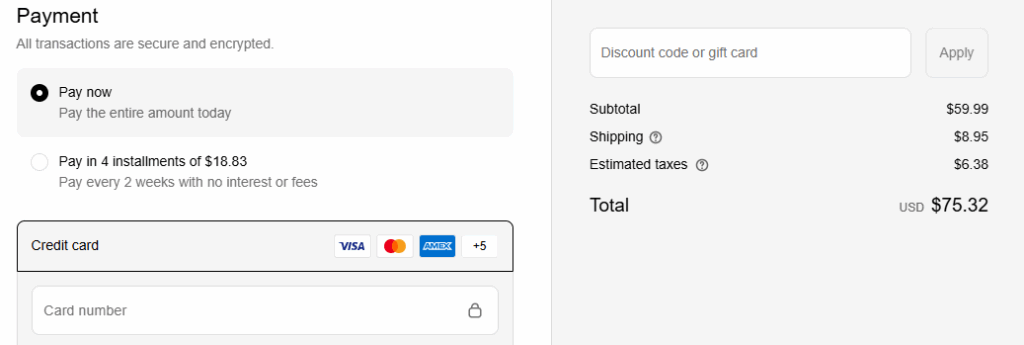
Since I’m on a strict no-spend streak right now, it took everything in me not to hit “complete purchase.” I added a pair of shoes to my cart anyway (in the wrong size, just to keep myself honest) so I could see the payment options firsthand.
At checkout, my total came to $75.32, including shipping and taxes. Shop Pay automatically offered two choices: pay the full amount now, or sign up for installments of $18.83 every two weeks with no interest or fees. The setup was simple—just a click to choose how to pay, with major cards like Visa, Mastercard, and American Express supported. It was easy to see how tempting it would be to say yes to that “Pay in 4” button, especially when it’s laid out so cleanly beside your order total.
Shop Pay Review Snapshot
| Feature | Details |
|---|---|
| Type | Accelerated Checkout + Installment Option (via Affirm) |
| Availability | U.S., Canada, U.K., Australia — Shopify-based stores only |
| Payment Methods | Credit/debit cards, Shopify Balance, bank accounts |
| Installment Terms | 4 interest-free payments or longer financing (when approved by Affirm) |
| Security | Encrypted payment data, two-factor authentication (2FA) |
| Extras | Carbon offset shipping, order tracking in the Shop app, saved checkout info for online transactions |
Shop Pay streamlines checkout for shoppers while helping small businesses reduce cart abandonment. Once you enable Shop Pay on your Shopify store—or check out through a Shopify merchant—you’ll notice the checkout automatically fills in saved shipping and billing details, reducing the entire process to just a few taps.
Step-by-Step: How Shop Pay Works (For Buyers)
Using Shop Pay is quick and straightforward—no merchant setup or tech knowledge required. Here’s exactly how it works from the shopper’s side:
- Select Shop Pay at Checkout:
When you’re ready to buy, look for the purple Shop Pay button at checkout. It appears automatically on any store that supports Shopify Payments. - Enter Your Information:
The first time you use it, you’ll enter your email, phone number, and payment method, then receive a quick text or email code to verify your account. - Add Shipping Details:
Type in your shipping and billing addresses once—Shop Pay will securely save them for next time. - Choose How You Want to Pay:
You can pay in full immediately or, if eligible, choose Pay in 4 interest-free installments (handled by Affirm). Each payment is automatically billed every two weeks until the total is paid off. - Complete Your Purchase:
After confirming, you’ll see your order summary and can track everything in the Shop app, including shipping updates and receipts.
When I tested the process myself, it was surprisingly easy. I went to a merchant site, added something to my cart, clicked the Shop Pay button, entered my email and phone number, verified my code, added my shipping info, and would have clicked “complete purchase” if I had really wanted the product. The entire process took less than five minutes—no extra apps or logins required.
Where You Can Use Shop Pay
Shop Pay is exclusive to Shopify-powered stores; brands like Allbirds, Steve Madden, Spanx, Gymshark, Ruggable, and Kylie Cosmetics use it as their main checkout tool. Any business running on Shopify Payments can enable it, so you’ll see the purple button across millions of online merchants, from independent boutiques to major brands.
Shop Pay also works on Meta and Google integrations, so you can complete purchases through Facebook Shop, Instagram Shop, or Google Pay listings without leaving the platform. Best of all, Shop Pay protects your information and credit card details during payment processing.
Pros
- Fast, one-tap checkout for repeat purchases (one of the best Shop Pay benefits)
- Encrypted data storage + 2FA keeps personal details secure
- Carbon-neutral shipping through Shop Pay’s offset program
- Optional installments via Affirm — no interest on Pay-in-4 plans
- Order tracking and receipts built into the Shop app
Cons
- Limited to Shopify merchants, so you can’t use it on non-Shopify sites like some Shop Pay alternatives
- Installment plans require Affirm approval and may include interest for long-term financing
- Customer support is split between Shopify and Affirm, depending on the issue
- Fewer payment modifications than standalone BNPL apps
How Shop Pay Compares to Other Payment Options
| Service | Best For | Key Difference |
|---|---|---|
| Sezzle | Short-term BNPL with payment rescheduling flexibility | Standalone app usable anywhere, not limited to Shopify |
| Afterpay | Simple Pay-in-4 plans at large retailers | Broader merchant reach, but no order-tracking integration |
| Affirm | Larger purchases and credit-based financing | Actually powers Shop Pay Installments under the hood |
| Apple Pay / Google Pay | Device-based express checkouts | Don’t offer installments or built-in order tracking |
Bottom Line: Is Shop Pay Worth It?
For most online shoppers, yes — Shop Pay is worth using for its speed and security alone. It eliminates the tedious form-filling that often leads to abandoned carts and adds the option to split payments on qualifying orders without extra apps or accounts.
For merchants, it’s also a conversion powerhouse. Shopify reports that Shop Pay checkouts convert up to 50% faster than standard guest checkout flows.
Just remember: Shop Pay isn’t a credit card and doesn’t build credit. If you use installments, Affirm’s approval and terms apply, so review those carefully before splitting a purchase. Used responsibly, Shop Pay is one of the safest and smoothest checkout experiences available online today.
Tip: If you prefer more flexibility or want to use a virtual card anywhere online, check out Sezzle, another buy now, pay later option that helps you stay in control of your spending.
FAQs
Shop Pay is Shopify’s secure, accelerated checkout system that saves your payment and shipping details for faster future purchases. It can also offer installment options through Affirm on eligible orders.
Not technically. Shop Pay itself is a checkout platform. The Shop Pay Installments feature is powered by Affirm, which provides Pay-in-4 or monthly payment plans based on approval.
Pay-in-4 installment plans are interest-free, unlike credit card company rates. However, longer-term financing options through Affirm may include interest depending on credit factors.
Only on Shopify-powered websites that have enabled Shop Pay as a payment option. You’ll see the purple Shop Pay button during checkout if it’s available.
Yes. It uses encrypted data, two-factor authentication (2FA), and secure servers to protect payment details during customer transactions. Personal information isn’t shared with merchants beyond what’s needed for the transaction.
Yes. It can be used alongside other express checkouts, but it functions as a separate system designed specifically for Shopify stores.
Faster checkout, higher conversion rates, and access to eco-friendly carbon offsetting are automatically included with every Shop Pay transaction.